The article
Someone on your team spent three hours last Tuesday doing the same research they did three weeks ago.
They opened twelve browser tabs. Copied things into a doc. Summarised it into a slide. Send the slide. The meeting happened. Then someone asked for an update, and the whole process started again.
That is not a productivity problem. It is an architecture problem. And if you have been waiting for AI to solve it, the wait is over, but not in the way most people think.
Most AI tools give you a better search engine. They answer questions faster. They generate text. They do not actually do the work. The distinction matters more than most people realize, and it is the reason learning how to build an AI agent is the most valuable thing a non-engineer can do right now.
What an AI Agent Actually Is (and What It Is Not)
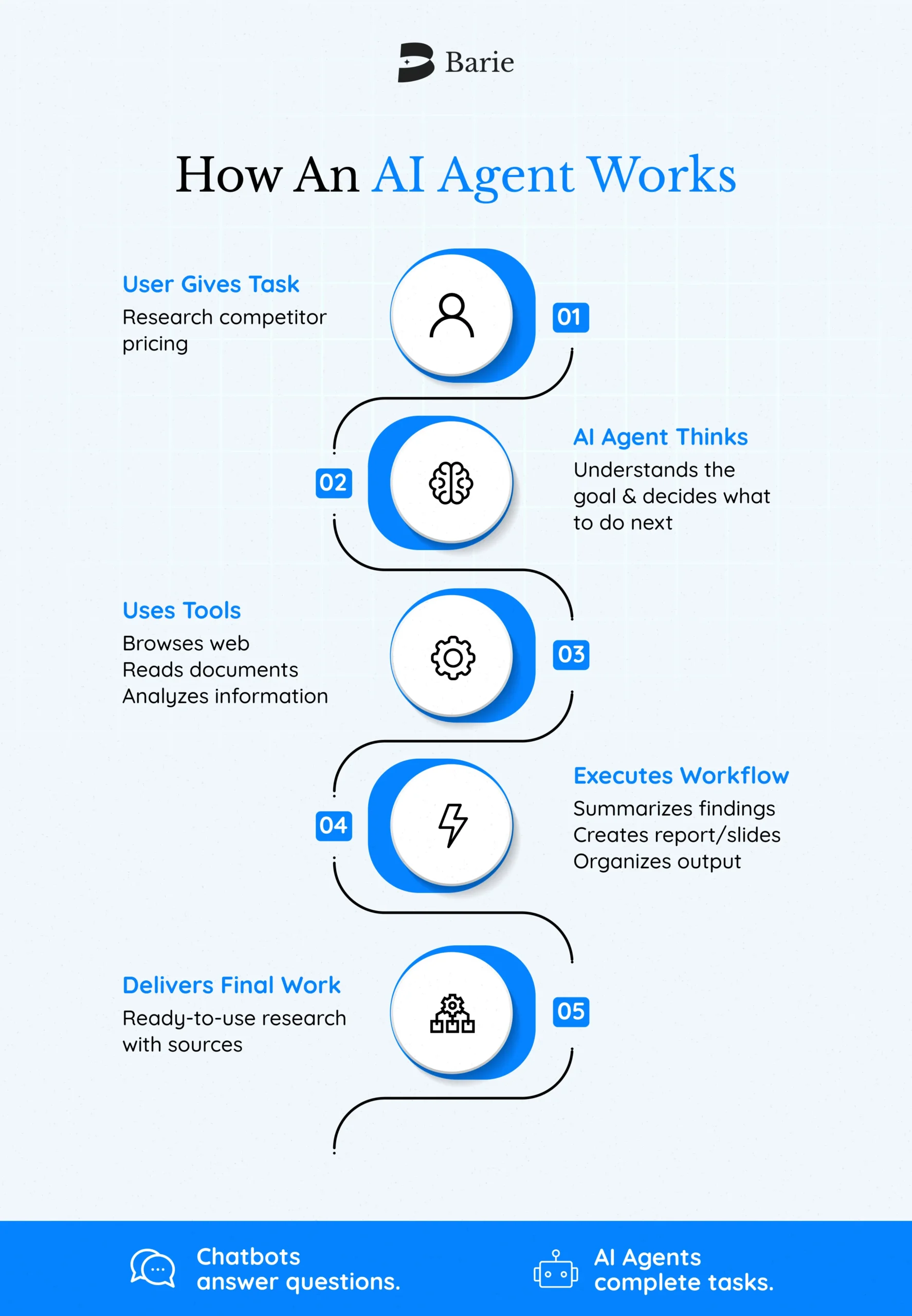
An AI agent is a system that completes a workflow on your behalf, from start to finish, using whatever tools it needs to get there.
That is different from a chatbot. A chatbot answers. An agent executes.
Think about the difference between asking a colleague “what are our top three competitors doing with pricing?” versus handing that question to someone who goes and actually researches it, synthesizes multiple sources, checks for recent updates, and delivers a structured brief with citations. One is a conversation. The other is work getting done.
Agents make decisions at each step of a workflow, select the right tools to move forward, and know when the job is finished. They can browse the live web, query databases, generate documents, and hand tasks off to other specialized agents, all without a human steering every move.
When to Build an AI Agent (and When Not To)
Before committing to building an agent, the question is not “could an agent do this?” The question is whether your workflow actually needs one.
Agents earn their value in three types of situations. The first is complex decision-making, workflows where the right answer depends on context, not a fixed rule. Approving a refund. Evaluating a vendor. Deciding which research direction to pursue. The second is heavy reliance on unstructured data, situations involving documents, web pages, emails, or anything that cannot be processed by a simple spreadsheet formula. The third is processes that have resisted every attempt at automation because the rules keep changing or there are too many edge cases to hard-code.
If your workflow is simple, repetitive, and fully rule-based, a standard automation tool probably handles it fine. Build an agent when the work actually requires judgment.
How to Build an AI Agent Without Writing Code
This is where most guides lose non-engineers. They describe the architecture correctly and then immediately show a Python script.
Here is what that architecture means in plain terms.
Every agent has three components. A model, the reasoning engine that decides what to do next. Tools, the functions the agent can call to take action or retrieve information, like searching the web, reading a document, or updating a record. And instructions, the guidelines that define how the agent behaves, what it is allowed to do, and when to stop.
The model does the thinking. The tools do the doing. The instructions keep everything within the right boundaries.
For non-engineers, the entry point is not code. It is defining these three things clearly in plain language. What decision does the agent need to make? What sources or systems does it need to access? What is the expected output? The more specific your answers, the better the agent performs.
What Most People Get Wrong When They Start
They build for complexity before they have established what works simply.
The practical approach: start with a single agent that handles one workflow end to end. Add tools incrementally. Test against real tasks. Only introduce multiple agents when a single agent consistently fails to follow instructions or selects the wrong tools, not because a multi-agent diagram looks more impressive.
When agents do need to coordinate, two patterns dominate. The manager pattern uses one central agent to delegate tasks to specialized sub-agents and synthesize the results. The decentralized pattern lets agents hand off to one another based on the workflow. Both are valid. The choice depends on whether you need one agent maintaining control over the user experience, or multiple specialists taking turns as needed.
The Part Everyone Skips: Guardrails
Building an agent without guardrails is like hiring someone and giving them access to everything without any policies.
Guardrails are the checks that run alongside your agent to catch problems before they become incidents. They flag inputs that are off-topic, harmful, or attempting to manipulate the agent. They prevent sensitive data from leaking in outputs. They assess the risk of each action the agent is about to take; low-risk actions proceed automatically, high-risk actions pause for human review.
The guardrails that matter most early are simple: input validation, content filtering, and a clear escalation path to a human when the agent cannot complete the task. Refine from there based on what actually fails in production.
One principle that holds across every deployment: plan for human intervention from the start. Not as a fallback for when things go wrong, but as a deliberate part of the design. Set a limit on how many times an agent can retry before escalating. Flag irreversible actions for human sign-off until the agent has earned that trust through a track record.
How Barie Approaches This Problem
Most tools that claim to be AI agents are, fundamentally, still chat interfaces with a few integrations bolted on. They answer from training data. They cannot verify what they say. They generate outputs that sound authoritative and are sometimes wrong.
Barie does not answer from the training data. It goes to the live web, runs parallel research across multiple sources simultaneously, and shows you exactly where every piece of information came from. Every output is traceable. That is not a feature. That is a different philosophy of what AI is for.
For non-engineers building agents, this matters for a specific reason: you need to trust the agent’s output. A workflow that automates bad research faster is not a solution.
Barie’s Skills let you define specialized capabilities for your agent, pre-configured instruction sets that tell the agent how to handle specific domains without starting from scratch. Connectors link Barie to the tools your workflow already uses, enabling multi-step execution across apps rather than isolated answers. The Prompt Library gives you a starting point for common research and analysis tasks, tested and ready to adapt.
Barie aces the GAIA Level 3 benchmark, the most rigorous available test for complex, multi-step agentic tasks. Most tools do not publish GAIA scores. One million-plus hallucination-free chats across 25+ industries. That is not a marketing copy. That is a documented track record.
The Path Forward
Building an AI agent is not a software project. It is a workflow design problem.
Start by identifying one process that currently requires judgment, relies on unstructured information, or has too many exceptions to automate easily. Define what a good output looks like. Choose tools that give the agent access to the sources and systems it needs. Write clear instructions. Test against real tasks. Iterate.
The code is optional. The clarity is not.
If the first agent you build actually finishes work instead of just answering questions about it, you will understand immediately why the distinction between chatbots and agents matters.
Try Barie free. 900 credits, no card needed. See what it looks like when the research is actually done.