How Barie runs a full SEO audit on your website and identifies the top 20 ranking opportunities
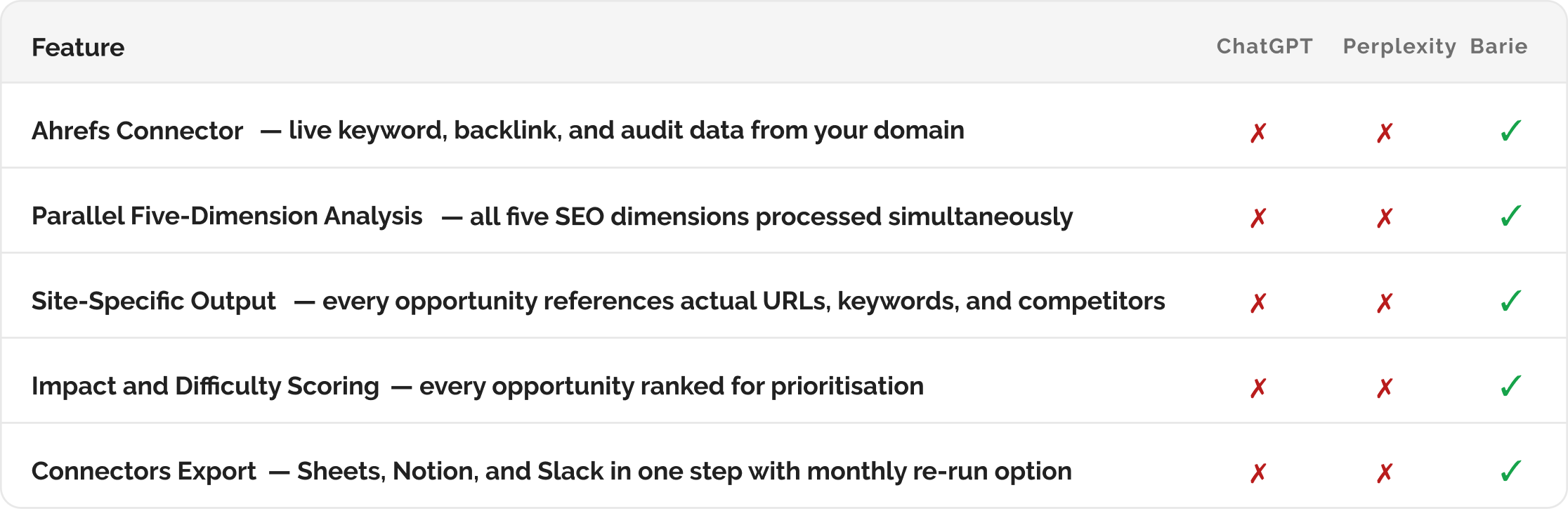
Barie connects directly to Ahrefs via the Ahrefs Connector. It pulls your live keyword rankings, backlink profile, site health data, and competitor positioning in real time. Then it analyses all five dimensions simultaneously and delivers 20 prioritised opportunities specific to your site, not a generic checklist that could belong to any website on the internet.
The problem with chat-based SEO advice
A content manager asked ChatGPT to run an SEO audit. The output was four pages long. It covered meta title optimisation, internal linking structure, page speed, Core Web Vitals, backlink acquisition, and keyword cannibalisation. It recommended targeting long-tail keywords in specific content gaps. It was professionally structured and completely useless.
Every single item was generic. None of it was specific to the actual website. ChatGPT had no access to the site’s keyword data, no view of the backlink profile, no knowledge of which pages were ranking where, and no information about what the competitors were actually doing. It produced the SEO checklist that applies to every website everywhere and called it an audit.
An SEO audit is not a checklist. It is a diagnosis. And a diagnosis requires data about the specific patient.
Why Barie uses the Ahrefs Connector: Barie connects directly to Ahrefs via the Ahrefs Connector before producing a single recommendation. It pulls your actual keyword rankings, your real backlink profile, your live site health score, and your specific content gaps against named competitors. Every opportunity in the output is derived from your data. Not from a training dataset about SEO best practices in general.
Your prompt
Task prompt
“Run a full SEO audit on our website and identify the top 20 opportunities to improve rankings.”
One sentence. Barie identifies the five SEO audit dimensions, connects to Ahrefs to pull live site data, runs parallel analysis across all five dimensions, and produces a prioritised list of 20 opportunities ranked by estimated impact and implementation difficulty. Here is the exact workflow.
1: Ahrefs Connector Activated
Step 1: Barie connects to Ahrefs and pulls your live site data
Before any analysis begins, Barie authenticates with the Ahrefs Connector and retrieves the live data for your domain. This is the step that makes the output site-specific rather than generic. The data pulled here is what every recommendation in the output is grounded in.
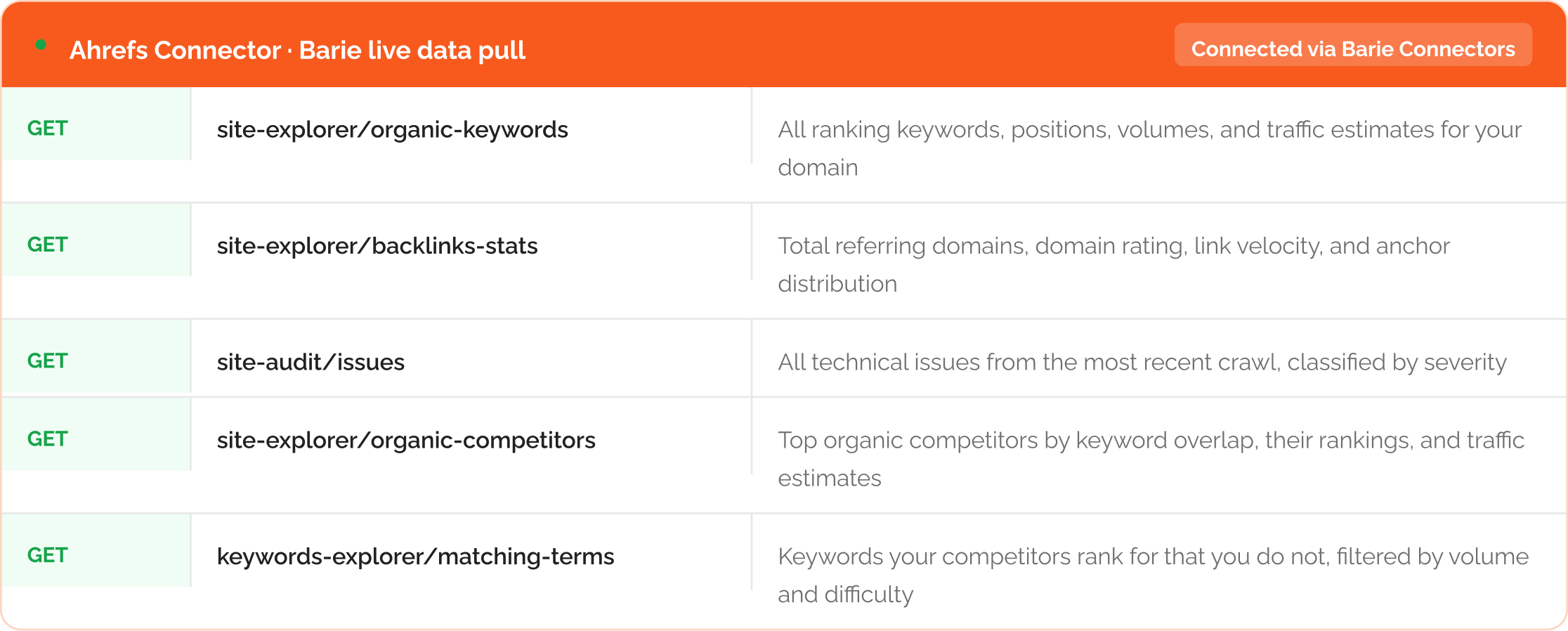
All five data pulls happen simultaneously: Barie does not pull keyword data, wait for it to complete, then pull backlinks. All five requests fire in parallel. The full dataset for your domain is available before analysis begins. What would take an SEO analyst thirty minutes of manual Ahrefs work, Barie retrieves in a single pass.
2. Five-Dimension Analysis
Step 2: Parallel analysis across five SEO dimensions
With the live Ahrefs data in hand, Barie runs five analytical threads simultaneously. Each thread examines one dimension of your site’s SEO performance and generates candidate opportunities. The combined outputs are then ranked and prioritised to produce the final list of 20.
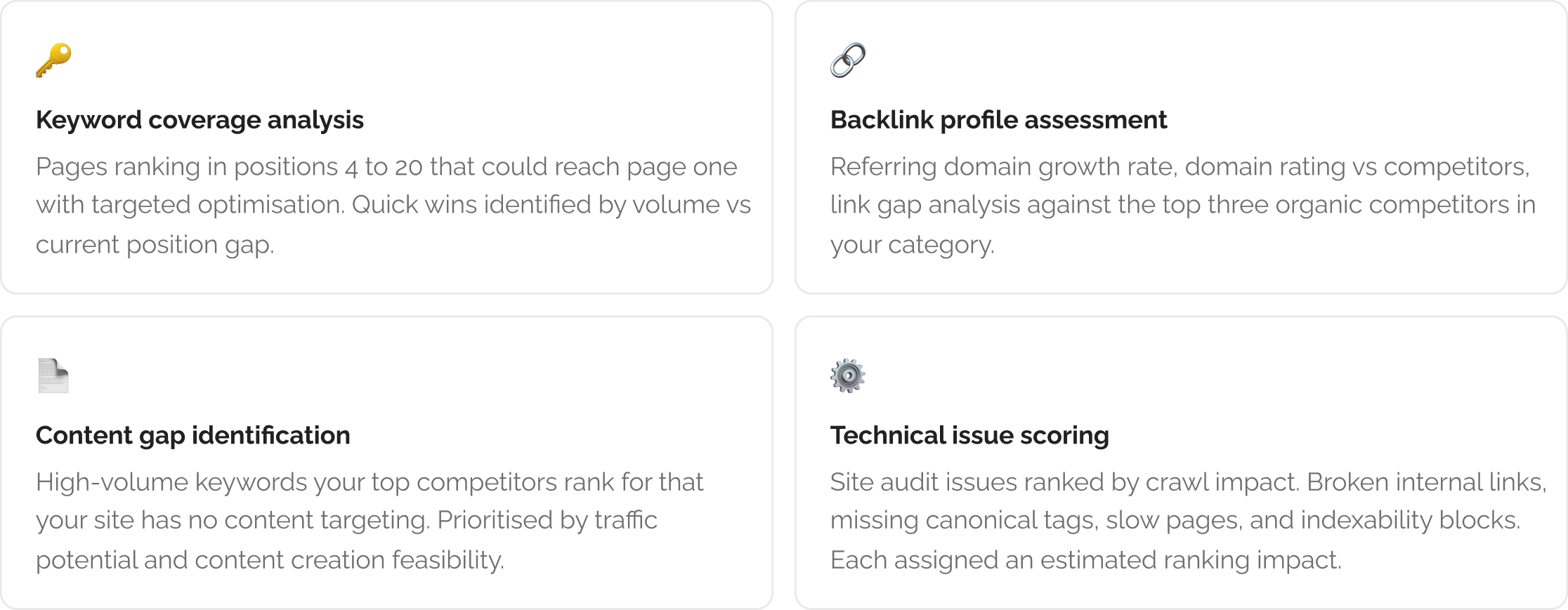
The fifth dimension is competitor positioning. Barie retrieves your top organic competitors from Ahrefs and analyses where they are outranking you on keywords you already have pages for. These are your most recoverable traffic losses and they appear in the opportunity list with specific page-level recommendations.
3: Prioritised Opportunities
Step 3: The top 20 opportunities, ranked by impact and difficulty
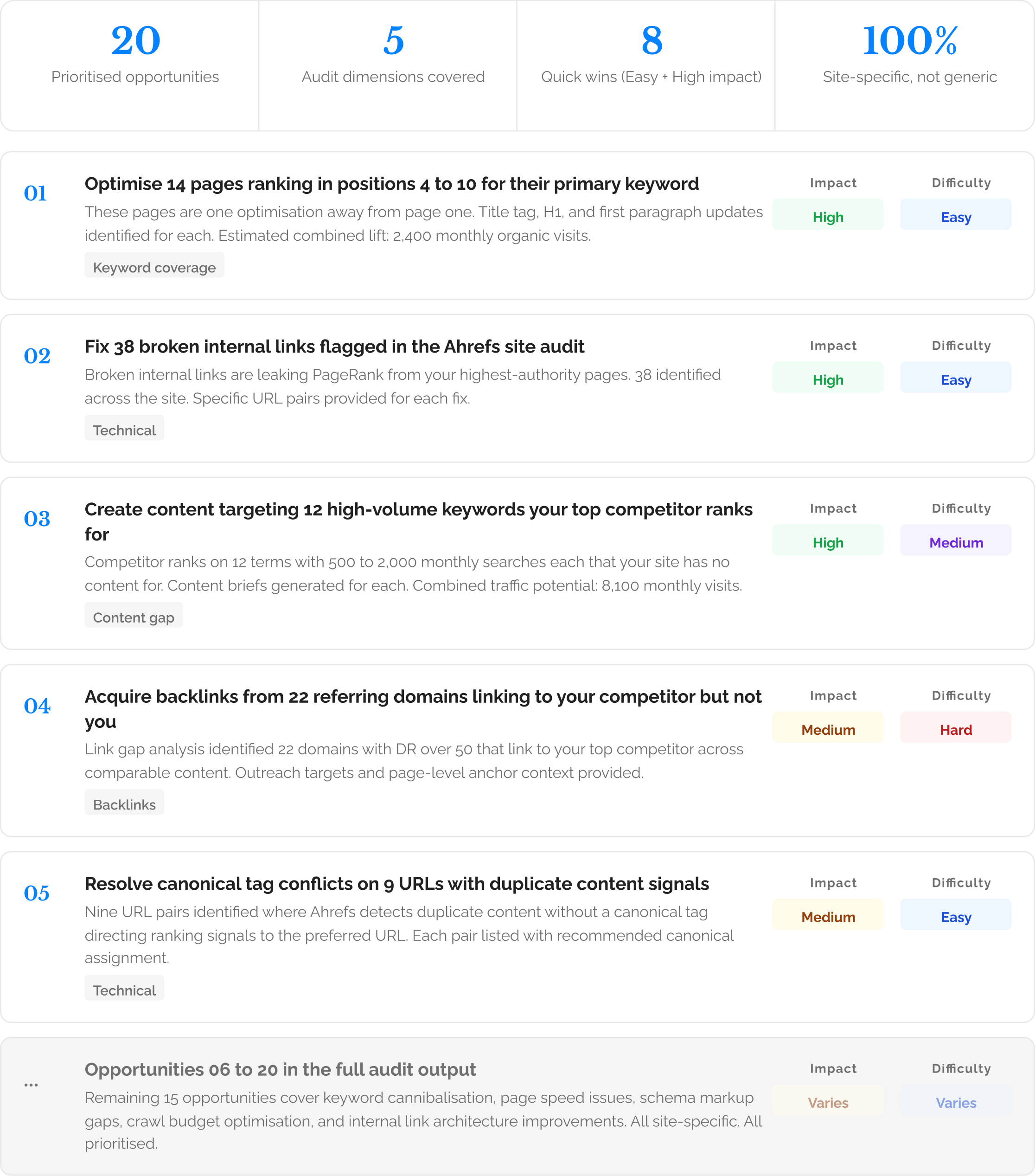
Every opportunity is specific to your domain: Opportunity 01 lists the 14 actual page URLs. Opportunity 03 names the 12 specific keyword gaps with their search volumes as reported by Ahrefs at retrieval date. Opportunity 04 lists the 22 referring domains by name. This is your audit, not a template applied to your domain name.
4. Export via Connectors
Step 4: Audit exported to your workflow via Connectors

The full prioritised opportunity list exports to Google Sheets with columns for opportunity description, dimension, estimated impact, implementation difficulty, and the specific URLs or keywords involved. A formatted audit brief lands in Notion for the SEO lead to annotate and assign. A top five summary goes to Slack for the wider team. The Ahrefs data that powered the audit remains accessible through the Connector for future re-runs.
Re-run monthly to track progress: Configure Barie to re-run the audit on a monthly cadence using the Ahrefs Connector. As you implement opportunities, new ones surface from the fresh data. Your keyword positions shift, new technical issues emerge, competitors change their strategy. The audit stays current because the data it draws from is always live.
What you get
A site-specific SEO audit grounded in live Ahrefs data, covering keyword coverage, backlinks, content gaps, technical issues, and competitor positioning. Twenty prioritised opportunities, each with a specific description of what to do, an estimated impact rating, an implementation difficulty rating, and the actual URLs, keywords, or domains involved. Exported to Google Sheets, Notion, and Slack in one session.
What it would take an SEO consultant a half-day to compile from five separate Ahrefs reports, Barie delivers in one prompt. Every recommendation is specific to your site. Nothing is generic. Nothing is invented.
The Verdict
A generic SEO checklist is not an audit. An audit requires your data. Barie connects to Ahrefs, pulls your live keyword rankings, backlink profile, site health score, and competitor gaps, runs five parallel analyses, and produces twenty opportunities specific to your domain. The competitor in Opportunity 04 is your actual competitor. The 14 pages in Opportunity 01 are your actual pages. The 12 keyword gaps are gaps in your actual content. That is the difference between a research tool that reads about SEO and one that reads your site.
Barie features used in this task