Monitor Daily Federal Reserve News and Track Sentiment Trends for the Last 30 Days
The Fed doesn’t telegraph its moves plainly. It speaks in press releases, speeches, and congressional testimonies. Barie reads all of it, classifies every signal, and delivers a sourced sentiment briefing to your inbox every morning — without you lifting a finger.
- Finance & Banking
- Scheduled Task
- Live Monitoring
- Sentiment Classification
- 30-Day Trend Output
Your Prompt
“Monitor daily news about Federal Reserve interest rate decisions and summarise sentiment trends for the last 30 days.”
A portfolio manager set up a Google Alert for “Federal Reserve interest rates.”
She got 47 emails in a week. News articles. Opinion pieces. Rewrites of rewrites. Not one of them told her whether the aggregate tone across all Fed communications had shifted hawkish or dovish over the past month.
She was drowning in signal and still had no read on the trend.
That is the problem. Not a lack of information. A complete absence of synthesis. Barie was built to solve exactly this.
The Federal Reserve communicates in layers. FOMC statements. Chair press conferences. Fed Governor speeches. Regional Fed presidents contradicting each other in the same week. Beige Book releases. Congressional testimonies. Each source carries different weight. Each shifts the market’s interpretation of where rates are heading.
Tracking this manually is a full-time job. Asking a standard AI about it produces a confident paragraph drawn from training data that is months out of date — a snapshot dressed as current analysis.
Barie does neither. It monitors the live web, classifies sentiment across each source type, builds a 30-day trend, and delivers it as a structured briefing. Scheduled. Every morning. Set once.
Step 1: Task Decomposition
Before Barie monitors anything, it maps what monitoring actually requires. This task contains at least five distinct workstreams. Conflating them produces noise. Separating them produces a usable briefing.
01 — Source Identification
Mapping the Fed Communication Ecosystem
Barie identifies every authoritative source: federalreserve.gov, FOMC statement archive, individual Fed Governor speech calendars, regional Fed bank publications, and the primary financial outlets that break Fed news first.
02 — Classification Schema
Defining Hawkish / Dovish / Neutral
Before pulling a single article, Barie sets the classification framework. Hawkish signals: rate hike language, inflation prioritisation, balance sheet reduction. Dovish: rate cut signals, employment emphasis, economic softness concern. Neutral: data dependency, wait-and-see posture.
03 — Temporal Structure
Structuring the 30-Day Window
The task requires trend analysis, not a single snapshot. Barie structures the output as a day-by-day sentiment log — which days produced hawkish signals, which dovish, how the tone has shifted across the full 30-day window.
04 — Scheduling Setup
Configuring the Daily Repeat
This is not a one-off query. Barie treats it as a recurring task — the monitoring schedule is set at the point of configuration. New data added to the 30-day window each morning. Oldest data rolled off. The briefing lands at the same time, every day.
Why this step is not optional
“Monitor the Fed” sounds simple. It is not. Without a defined classification schema, sentiment analysis is just opinion. Without a temporal structure, you get a pile of articles with no trend. Without scheduling, you have a one-time query that goes stale. Barie maps all of this before it does anything. That is what separates a useful output from a useful-sounding one.
Step 2: Parallel Live Research, Scanning the Fed Ecosystem
Each morning Barie fires parallel research threads across every relevant source category simultaneously. Not sequentially. Not one outlet at a time.
Official Fed communications carry the most weight. Financial news outlets provide the market’s interpretation. Academic and think-tank analysis contextualises the signals. Barie scans all three tiers and weights them accordingly in the sentiment classification.
Sources monitored daily
- federalreserve.gov
- FOMC Statement Archive
- Bloomberg Fed Coverage
- Reuters Markets
- Wall Street Journal
- Financial Times
- Fed Regional Banks
- CME FedWatch
For each source pulled, Barie extracts the specific language that drives the classification — exact phrases like “remains committed to returning inflation to 2 percent” (hawkish) versus “carefully assess incoming data” (neutral drift) versus “labor market conditions have eased” (dovish lean). The classification is not an opinion. It is documented linguistic evidence, sourced and dated.
What standard AI gives you instead
Ask ChatGPT for a Fed sentiment summary and it will produce a paragraph that sounds authoritative. The problem is that it is pulling from training data, which may be six, twelve, or eighteen months out of date. It cannot tell you what Jerome Powell said at this week’s press conference. It cannot tell you how yesterday’s CPI release shifted the language coming out of San Francisco Fed. It is answering a question about the present from the past. You would not know unless you checked.
Step 3: Sentiment Classification, Reading the Fed’s Signals
Every article and communication pulled goes through Barie’s classification layer. Not a vibe check. A structured analysis of the specific language used, the source authority, and the context — rate decision timing, recent economic data releases, market conditions at the point of the statement.
Each item is classified as hawkish, dovish, or neutral. Weighted by source authority. Logged by date. The 30-day trend emerges from the aggregate, not from any single article.
What makes this classification trustworthy
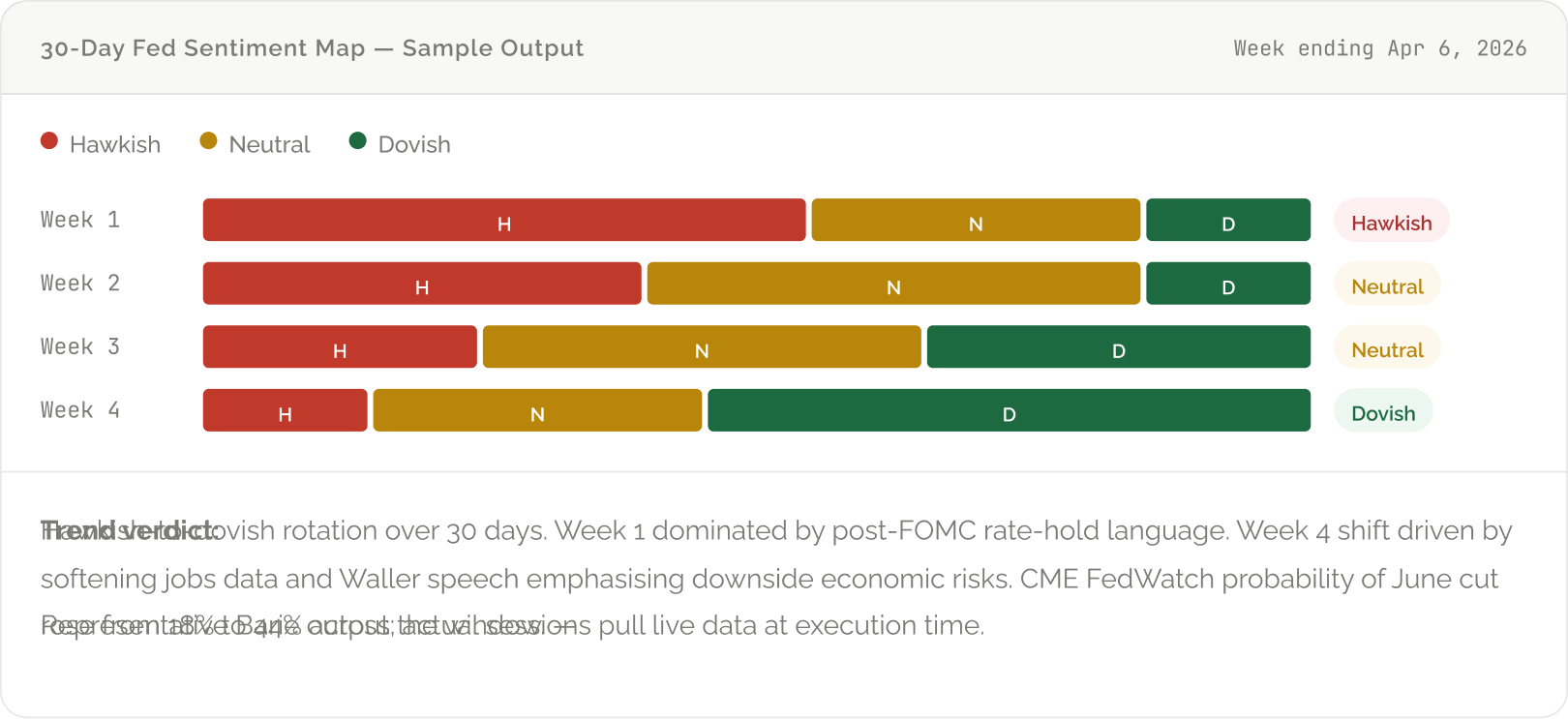
Every sentiment assignment is documented. The hawkish classification on Day 4 links to the specific Fed Chair quote that drove it. The dovish shift in Week 4 traces back to three sources: a Waller speech transcript, a Reuters analysis, and an FT piece on slowing employment data — each linked, each dated. You are not trusting a score. You are trusting evidence.
Step 4: Scheduled Task, Set Once, Brief Every Morning
This is where Barie separates from every other research tool in the market.
You set this task once. Barie runs it every morning. New data is pulled, classified, and appended to the rolling 30-day window. The oldest day rolls off. The briefing is updated, formatted, and delivered before your first meeting.
No prompt. No login. No manual research. A finished intelligence product, waiting for you.
Barie Scheduled Tasks — Configure Once, Run Forever
Set the monitoring frequency (daily), the delivery time (7:00 AM, before markets open), and the output format (structured briefing to email, Notion page, or Slack channel). Barie handles the rest. The task runs autonomously every day until you cancel it. No prompting. No maintenance. No manual anything.
The 30-day rolling window means the briefing is always fresh. Week one from last month drops off as today’s data lands. What you are reading every morning is always the most current 30-day picture of Fed sentiment — not a snapshot from three weeks ago.
Step 5: The Morning Briefing, What Lands in Your Inbox
The output is not a wall of text. It is a structured financial intelligence brief — formatted for a decision-maker who has four minutes before their first call.
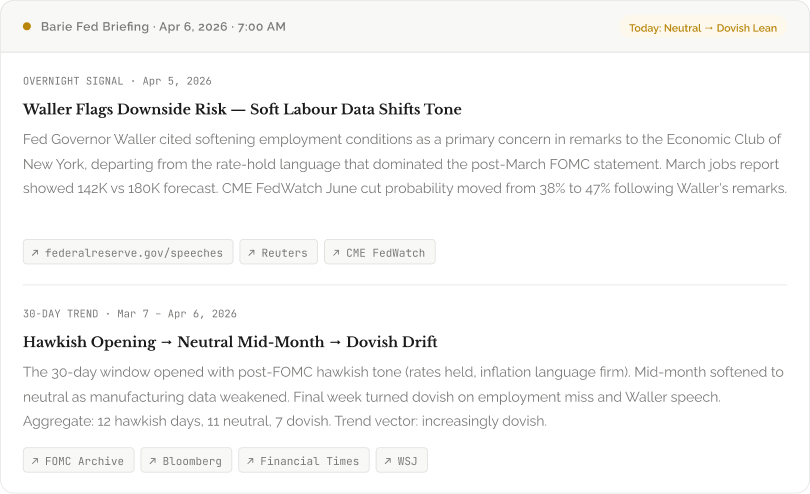
Representative Barie briefing format. Actual outputs pull live data at execution time. All sources linked and traceable.
Every item in the briefing has a source link. Every classification has documented evidence. You can spend two minutes reading the summary and move on, or spend fifteen minutes tracing every claim back to its origin. Either way, the analysis holds.
Step 6: Export via Connectors, Where the Briefing Goes
The briefing does not have to live in Barie. It goes where your workflow lives.

Every morning’s briefing appends to a running log in Google Sheets — date, sentiment score, key signal, source count. A portfolio manager’s entire 30-day sentiment history lives in a spreadsheet they never had to build manually. One prompt. Configured once. Logging forever.
30-Day Sentiment Log — Export Preview
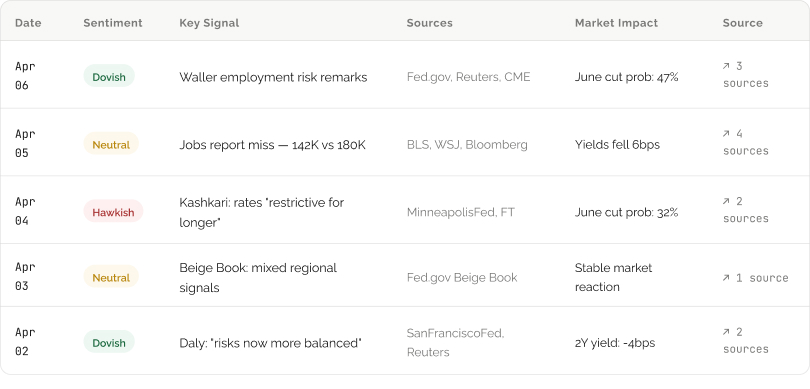
Representative export format. Each row generated by Barie’s daily scheduled run. All source links traceable.
- Push to Google Sheets
- Post to Slack
- Download PDF Brief
What You Get From This Task
A daily Fed sentiment briefing — hawkish, dovish, or neutral — classified from live sources at the time of each morning’s run. Not drawn from training data. Not from three months ago. Today’s data, today’s classification.
A rolling 30-day sentiment trend — the week-by-week shift from hawkish to neutral to dovish, with a documented verdict on where the aggregate is heading. Every day’s classification linked to its source evidence.
A source-cited log exportable to Google Sheets, Notion, or your CRM — every entry dated, sourced, and linked. Thirty days of auditable intelligence built automatically, without a single manual research session.
A scheduled, autonomous task that runs every morning without prompting. Configure once — delivery time, output format, connected app. After that, the briefing simply arrives.
Context-weighted classification that distinguishes between an official FOMC statement and a regional Fed president’s speech — the sources are not treated equally, because they do not move markets equally.
Barie Features Used in This Task
Deep Research: Multi-source live web monitoring across official Fed channels, financial news outlets, and market data aggregators. Every classification sourced and dated at execution time.
Scheduled Tasks: Configure the briefing once — daily frequency, delivery time, output format. Barie runs it autonomously every morning. No prompting required. No maintenance.
Parallel Subtasks: All source categories monitored simultaneously — official Fed communications, major financial outlets, and regional Fed publications — rather than sequentially. Each morning’s scan completes in a single session.
Source Verification: Every sentiment classification is backed by traceable source evidence — specific language from specific documents. Not aggregate scoring without documentation. An auditable evidence chain.
Connectors: Briefings push automatically to email, Slack, Notion, or Google Sheets. The daily log builds in the destination of your choice without any manual export step.
Structured Output: The briefing is formatted for fast consumption — headline signal, supporting evidence, 30-day trend, source links. A financial intelligence brief, not a research dump.