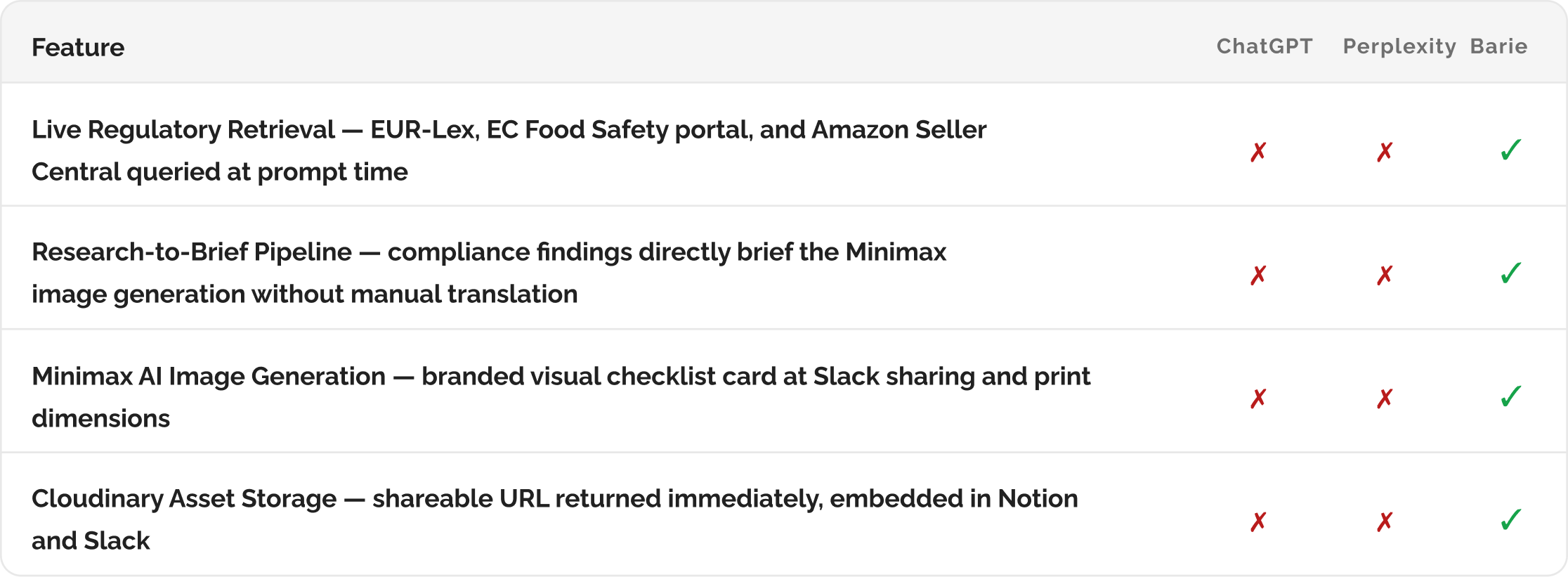
How Barie researches EU supplement compliance for Amazon, then generates a visual checklist image your team can share
Barie researches current EU food supplement regulations, Amazon EU category requirements, labelling obligations, and customs documentation from live official sources. It delivers a structured compliance checklist with a source link for every requirement, then uses AI image creation to generate a branded visual checklist image your ops team can share, print, or pin to their workspace. Research and asset creation in one prompt.
Why EU supplement compliance research is time-consuming and high-stakes
A seller trying to list dietary supplements on Amazon EU for the first time faces compliance obligations across four separate frameworks simultaneously. EU food supplement legislation under Directive 2002/46/EC and its national implementations governs permitted ingredients and maximum dosages. Amazon EU has its own category-specific requirements that go beyond the regulatory minimum and include specific documentation, ingredient approval lists, and listing restrictions. EU labelling law under Regulation 1169/2011 governs what must appear on the label and how it must be presented. And customs documentation requirements vary by country of origin and product category.
Most sellers piece this information together from a combination of Amazon Seller Central help pages, legal blogs of uncertain currency, forum posts from other sellers, and occasionally official regulatory texts that are dense and not written with a first-time seller in mind. The information landscape is fragmented, partially outdated, and easy to misread in ways that result in account suspension, customs holds, or product removals.
Barie retrieves from the current official sources, not the summarised versions: EU Directive 2002/46/EC is retrieved from EUR-Lex. Amazon EU category requirements are retrieved from the current Seller Central help documentation via Firecrawl. EU labelling regulations are retrieved from the current EC Food Safety pages. The research reflects what these sources actually say today, not what a legal blog said they said twelve months ago. And because the checklist is source-linked, any requirement can be verified in one click.
Your prompt
Task prompt
“Research logistics and compliance requirements for selling supplements on Amazon EU, then create a visual compliance checklist image I can share with my team.”
One sentence. Two deliverables. Before the research begins, Barie activates the connectors that handle both the live regulatory retrieval and the AI image generation. Here is the full workflow.
1: Connectors Activated First
Step 1: Three connectors activated — regulatory retrieval, image generation, and asset storage
This task requires both research capability and creative production capability. Barie activates Deep Research for regulatory document retrieval, Minimax for AI image generation of the visual checklist, and Cloudinary to store and serve the generated image asset. All three are activated before the first document is retrieved so the research output flows directly into the image generation brief without a manual handoff step between them.
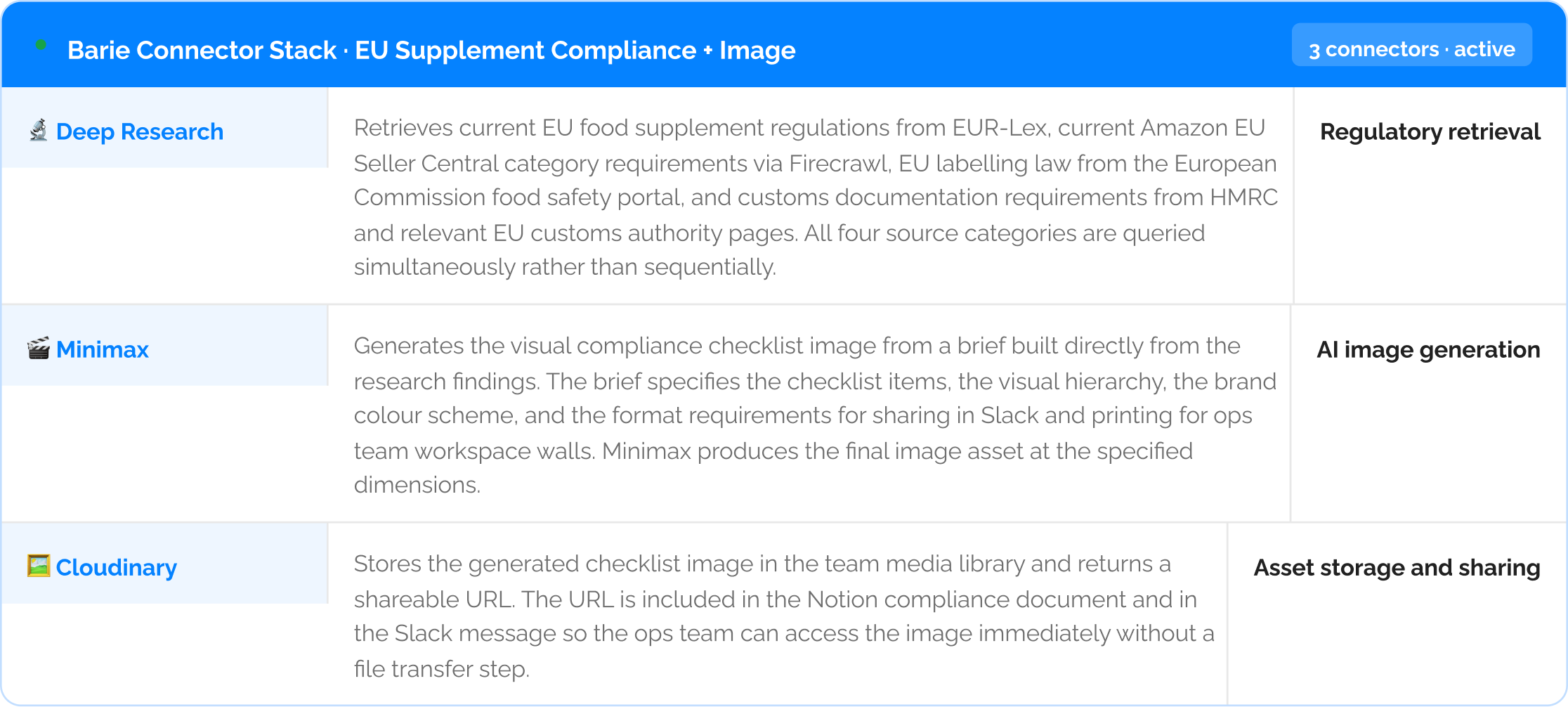
The research output directly briefs the image generation: Barie does not produce a compliance checklist and then separately produce an image that summarises it. The compliance checklist items identified in the research step become the direct input to the Minimax image generation brief. The image reflects exactly what the research found, structured for visual consumption, without a manual editing step in between.
Live Compliance Research
Step 2: Four compliance frameworks researched from live official sources
Deep Research retrieves current requirements across four compliance dimensions simultaneously. Each dimension draws from a different source type and each is equally capable of causing a listing rejection or account suspension if missed. The research does not stop at the summary level. It retrieves the specific requirement, the specific regulation or Amazon policy that mandates it, and the specific document or page the seller can verify it against.

3: Compliance Checklist Findings
Step 3: The compliance checklist — 22 requirements, 3 high-risk flags, every item sourced
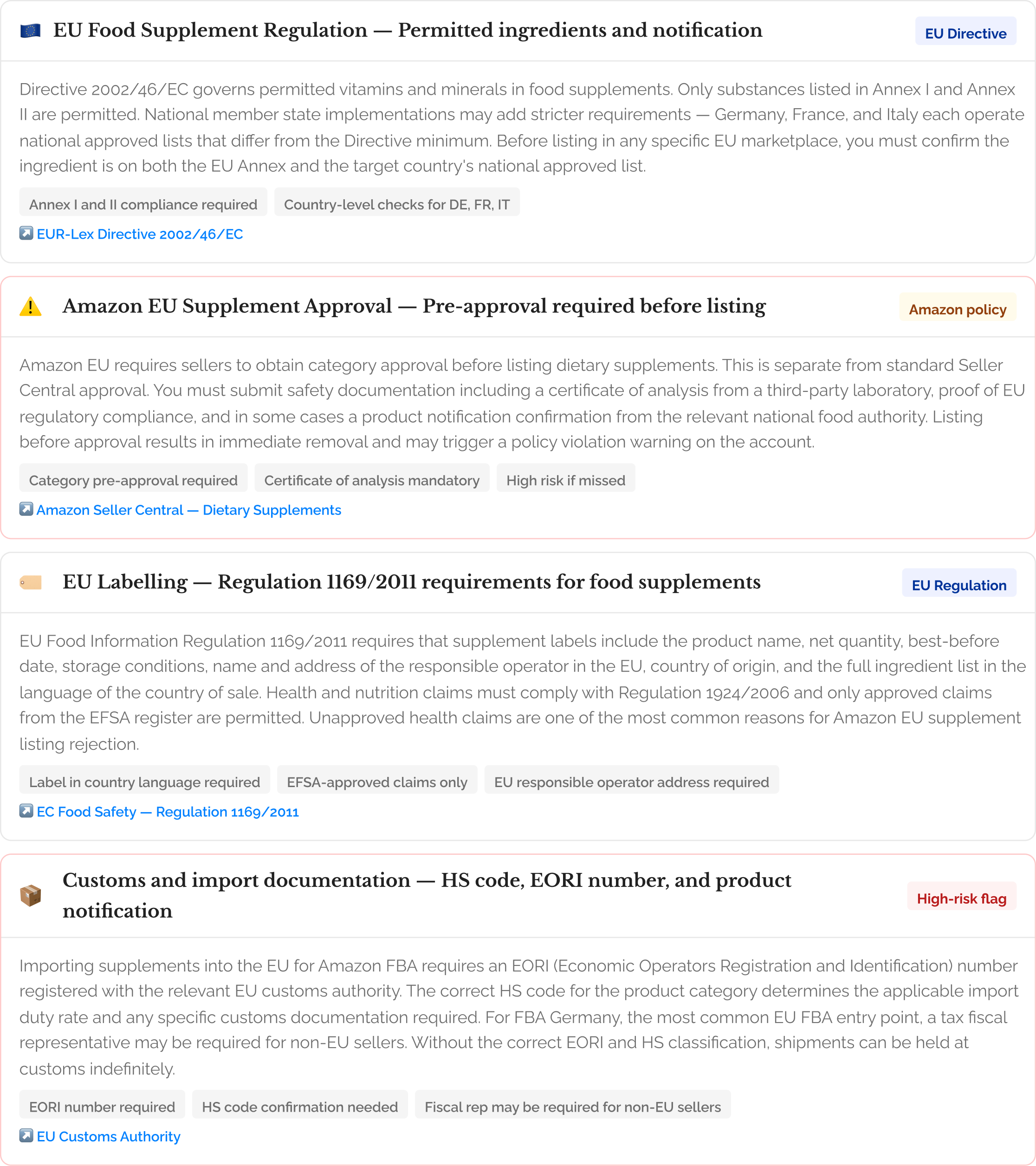
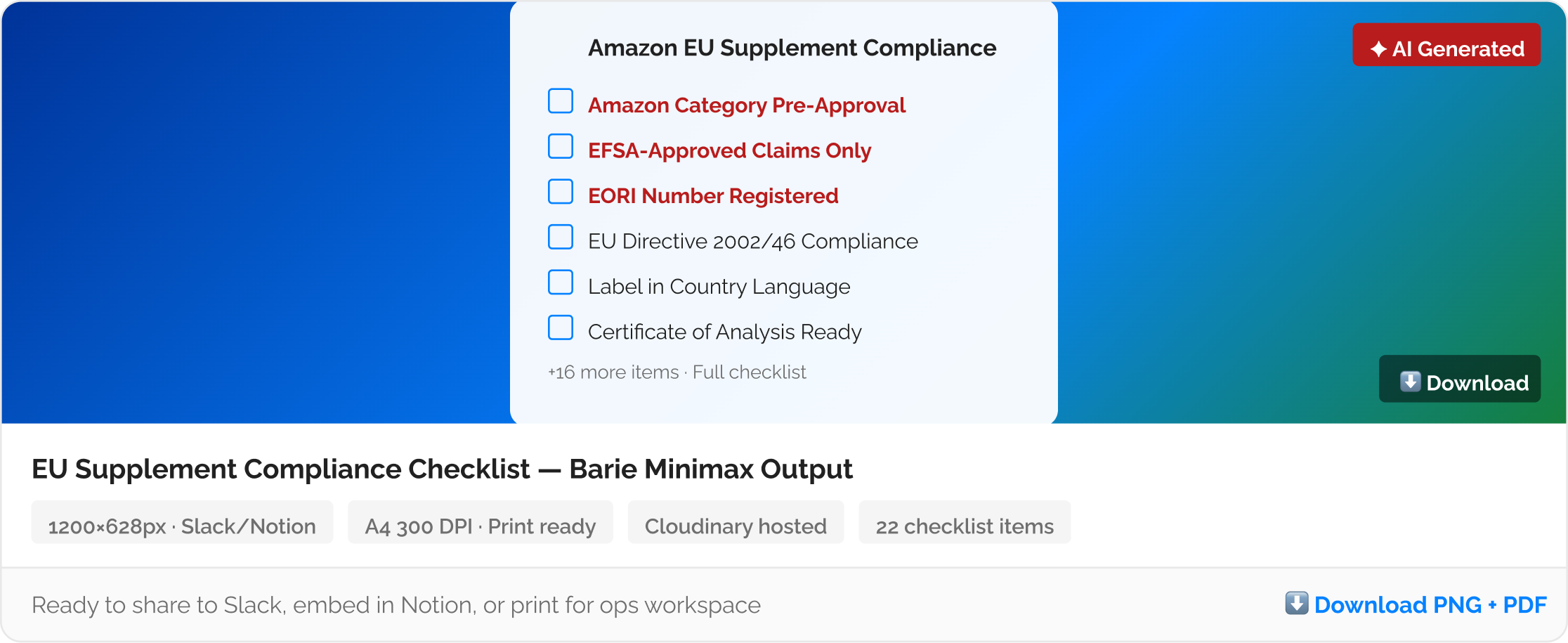
The three high-risk flags are the items most commonly missed: Amazon category pre-approval, EFSA health claim compliance, and EORI number registration are the three requirements most frequently absent from supplement sellers’ compliance preparation. All three are explicitly flagged in the checklist with their risk level and the direct source link. The visual checklist image generated in the next step places these three at the top of the visual hierarchy so they are the first items the ops team sees.
4. AI Image Generation
Step 4: The visual compliance checklist generated by Minimax — shareable, printable, ready
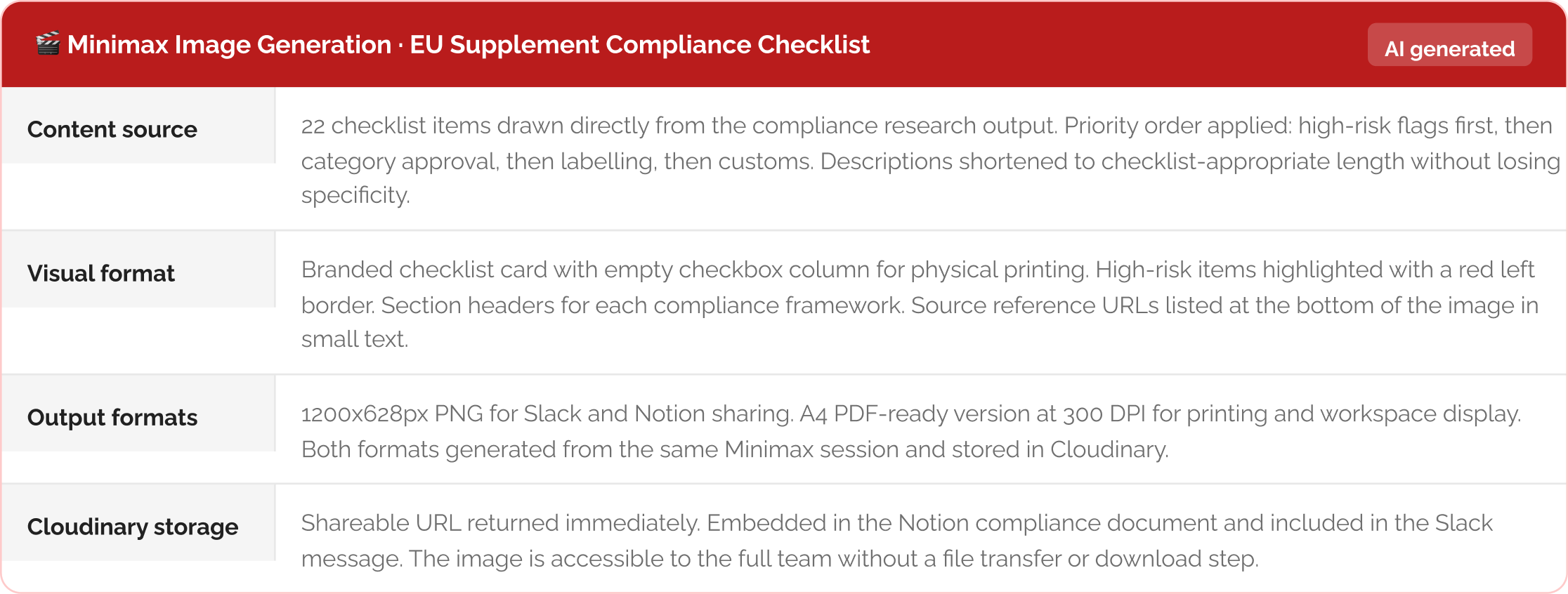
Once the compliance checklist is complete, Barie constructs the image generation brief directly from the research findings and passes it to Minimax. The brief specifies the checklist items in priority order with the three high-risk flags at the top, the visual format as a clean branded checklist card, the colour scheme aligned to the brand palette, and the output dimensions for both Slack sharing at 1200x628px and print at A4 resolution. Minimax generates the visual asset and Cloudinary stores it with a shareable link returned immediately.
5. Export and Distribution
Step 5: Compliance brief and image distributed to your ops and team tools
The full compliance brief with all 22 sourced requirements lands in Notion as a structured reference document with all source links active. The Cloudinary checklist image URL is embedded directly in the Notion document so anyone reading the brief can access the visual version in one click. Slack receives the checklist image and a brief summary of the three high-risk flags, posted to the relevant ops or seller account channel before the team’s next weekly review. A Word document version of the compliance brief is available for sharing with an external logistics partner or customs broker who needs the full detail in a transferable format.

Re-run when Amazon updates its category requirements: Amazon EU supplement category requirements are updated periodically without direct notification to sellers. Configure Barie to run a quarterly Firecrawl re-check of the Seller Central supplement category page and compare against the existing Notion compliance document. When a requirement changes, a Slack alert fires to the relevant channel and the Notion document updates. The checklist image can be regenerated from the updated brief in the same run.
What you get
A structured EU supplement compliance brief covering 22 requirements across four frameworks — EU food supplement regulation, Amazon EU category policy, EU labelling law, and customs documentation — all sourced to their primary official documents. Three high-risk flags identified and prioritised. A branded AI-generated visual compliance checklist image in 1200x628px and A4 print formats, hosted on Cloudinary with a shareable URL. The full brief delivered to Notion and the checklist image shared to Slack in one session. A Word document available for your logistics partner or customs broker. Configured for quarterly re-checks of Amazon category requirements.
The Verdict
EU supplement compliance for Amazon is not a single regulation. It is four overlapping frameworks, each maintained by a different authority, each capable of causing a listing removal or customs hold if missed. Piecing them together from blogs and forums produces a compliance picture that is partially outdated and impossible to verify. Barie retrieves from EUR-Lex, the European Commission food safety portal, and Amazon Seller Central directly, and every requirement links to the source that mandated it. The visual checklist means your ops team does not need to read the brief to know what to check before launch. One prompt produces both the research and the asset. That is what compliance preparation should look like.
Barie features used in this task