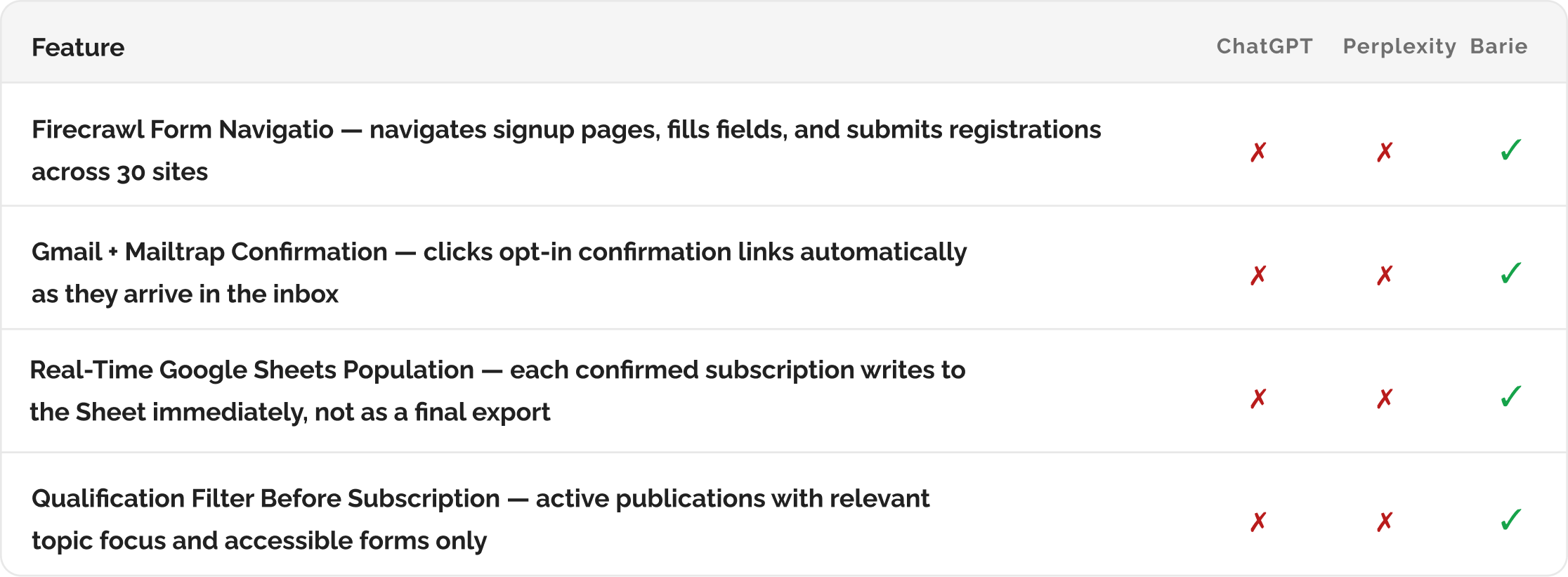
How Barie finds 30 industry newsletters, subscribes to each one, and compiles the full list into a spreadsheet
Barie researches newsletters and trade publications from live web sources, navigates to each signup page, completes the registration form, and populates a Google Sheet with the full list including name, URL, topic focus, and frequency. Thirty subscriptions. One prompt. Zero copy-paste. This is what agentic execution means.
Why newsletter research never actually gets done
A content strategist at a B2B SaaS company had been meaning to subscribe to the most relevant industry newsletters in her niche for four months. She knew the information would make her better at her job. She had a note in her task manager that said “find industry newsletters” that had been deferred eighteen times.
The actual task, when she finally started it, took nearly three hours. She searched for newsletters, opened each website, found the signup page, entered her email, hit submit, tabbed back, and repeated the process for each one. Of the twenty-six newsletters she eventually subscribed to, eleven required confirmation clicks in her inbox. Three had forms that broke partway through. Two required her to create a full account before she could subscribe. By the time she was finished, the task had consumed most of an afternoon and produced a spreadsheet she then had to fill out manually from memory.
The knowledge is valuable. The process of acquiring it is not. This is exactly the kind of multi-step agentic task that Barie handles end to end so the strategist can spend that afternoon doing something that actually requires her judgment.
What makes this an agentic task rather than a research task: Most AI tools stop at producing a list. Barie goes further. It navigates to each signup page, fills in the form fields, submits the registration, and records the outcome. When a form is broken, Barie logs it. When a confirmation click is required in Gmail, the Mailtrap connector handles the inbox confirmation. When the signup form is a full account creation, Barie flags it for manual completion. The research and the execution happen in the same session.
Your prompt
Task prompt
“Find the top 30 relevant industry newsletters and trade publications for our niche, subscribe to each one, and compile the list into a spreadsheet.”
One sentence. Three actions. Before the research begins, Barie activates the connectors that make all three actions possible inside a single session. Here is the complete workflow, starting with those connectors.
1: Connectors Activated First
Step 1: Four connectors activated before discovery begins
Research, form completion, inbox confirmation, and spreadsheet population are four distinct actions that require four distinct connector capabilities. Barie activates all four before the first newsletter search runs. This is not sequential setup. All four connectors are ready simultaneously so the discovered newsletters can be acted on immediately as they are found, rather than accumulating in a list that still needs to be worked through manually.
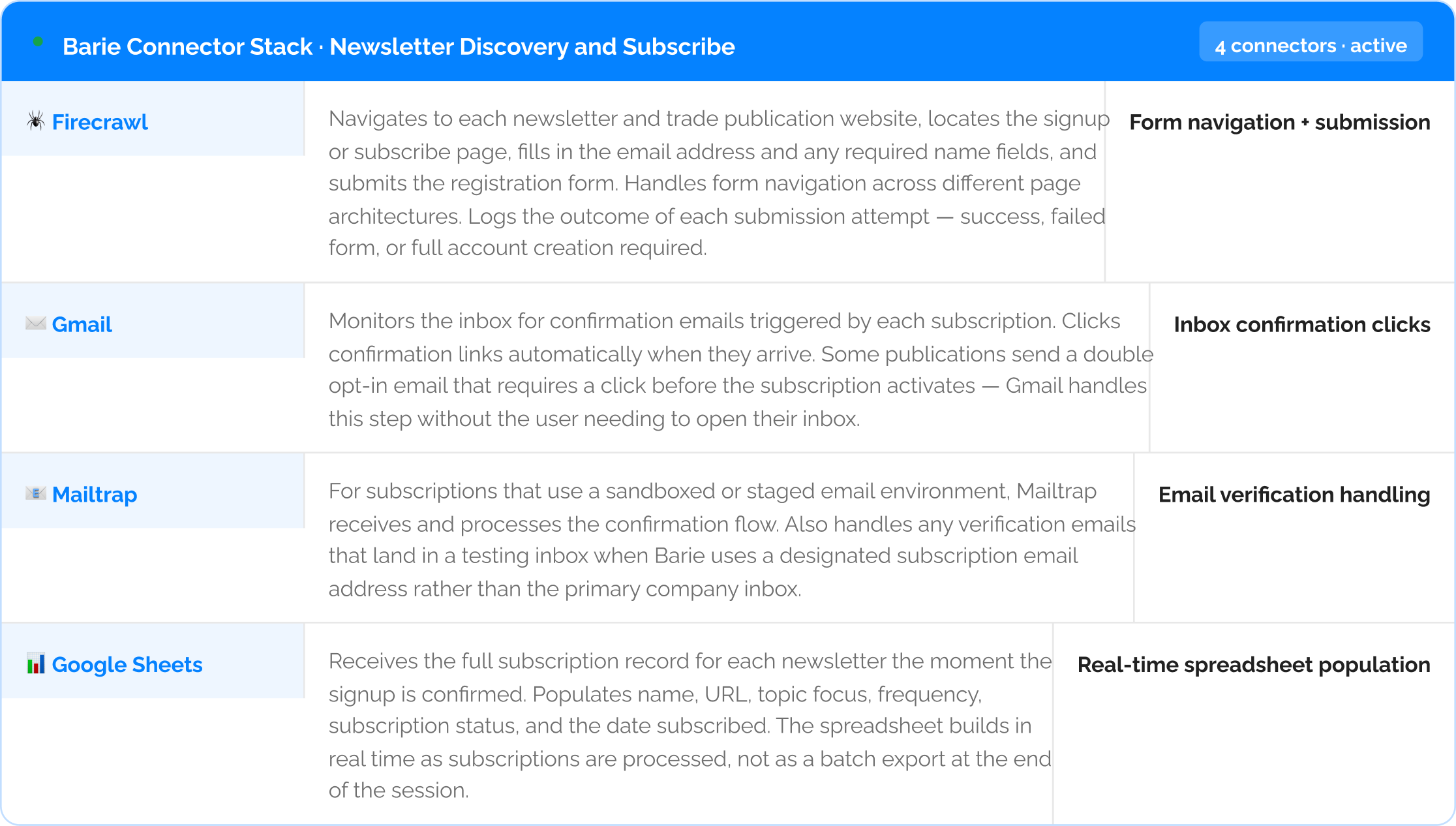
The Google Sheets Connector writes in real time, not at the end: As each subscription is confirmed, the Google Sheet row for that newsletter is populated immediately. If Barie completes 22 subscriptions before encountering a form that requires manual completion, the sheet already has 22 accurate rows. The user can see progress in real time and act on the confirmed subscriptions without waiting for the entire batch to finish.
2: Live Newsletter Discovery
Step 2: Discovery across live sources — publications qualified before subscription begins
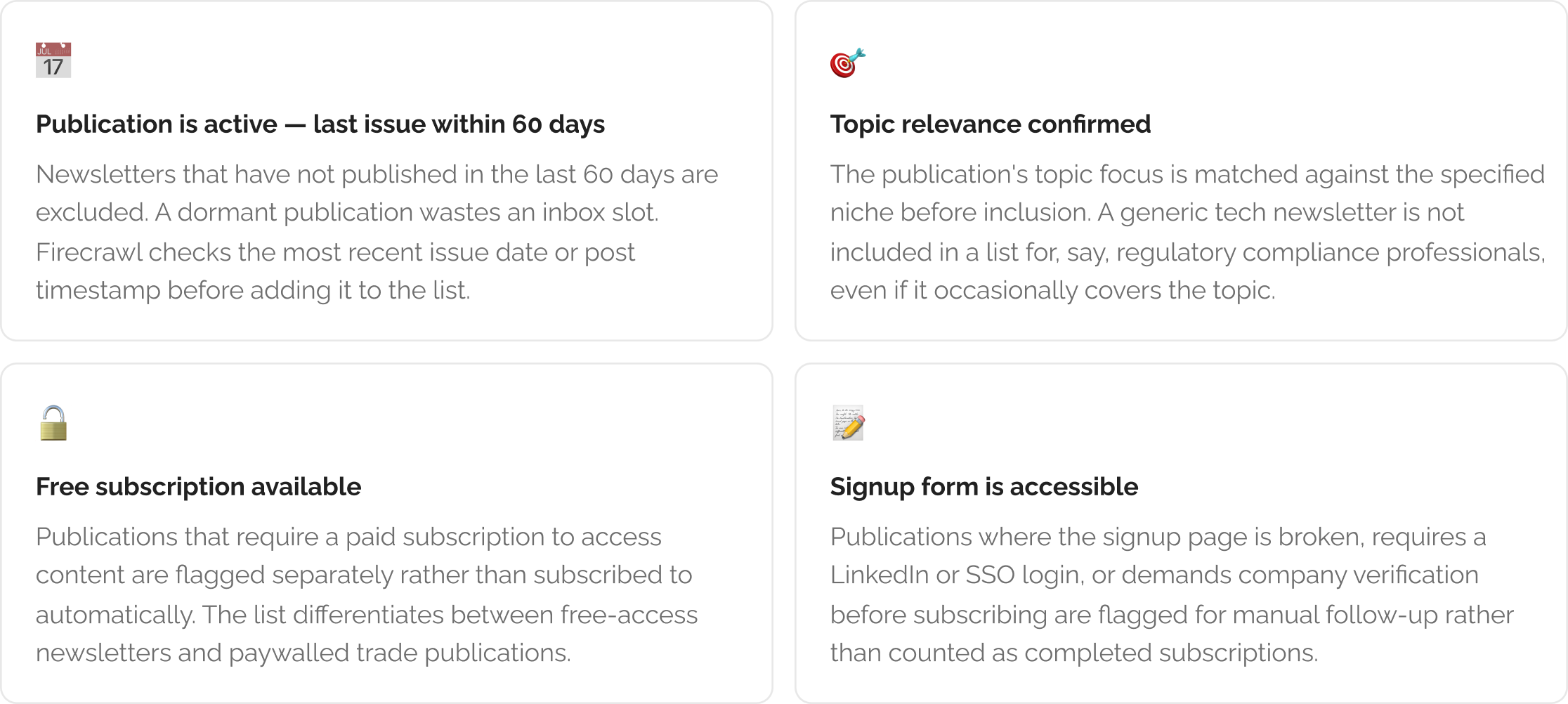
With all four connectors active, Barie runs the newsletter discovery across five live source types. The goal is not to find the first thirty results for “B2B SaaS newsletter.” It is to find the thirty that are most relevant, most active, and most likely to contain useful industry intelligence. Barie applies a qualification filter before adding any publication to the subscription list.

3: Automated Subscription Execution
Step 3: Barie navigates to each signup page, completes the form, and confirms via inbox

For each publication on the confirmed list, Firecrawl navigates directly to the subscribe page, fills in the email address and any required name fields using the credentials you have provided, and submits the form. Gmail monitors the inbox for confirmation emails and clicks the opt-in link the moment it arrives. Mailtrap handles any confirmation flow that lands in a secondary verification address. Each completed subscription is written to the Google Sheet immediately with its confirmed status.
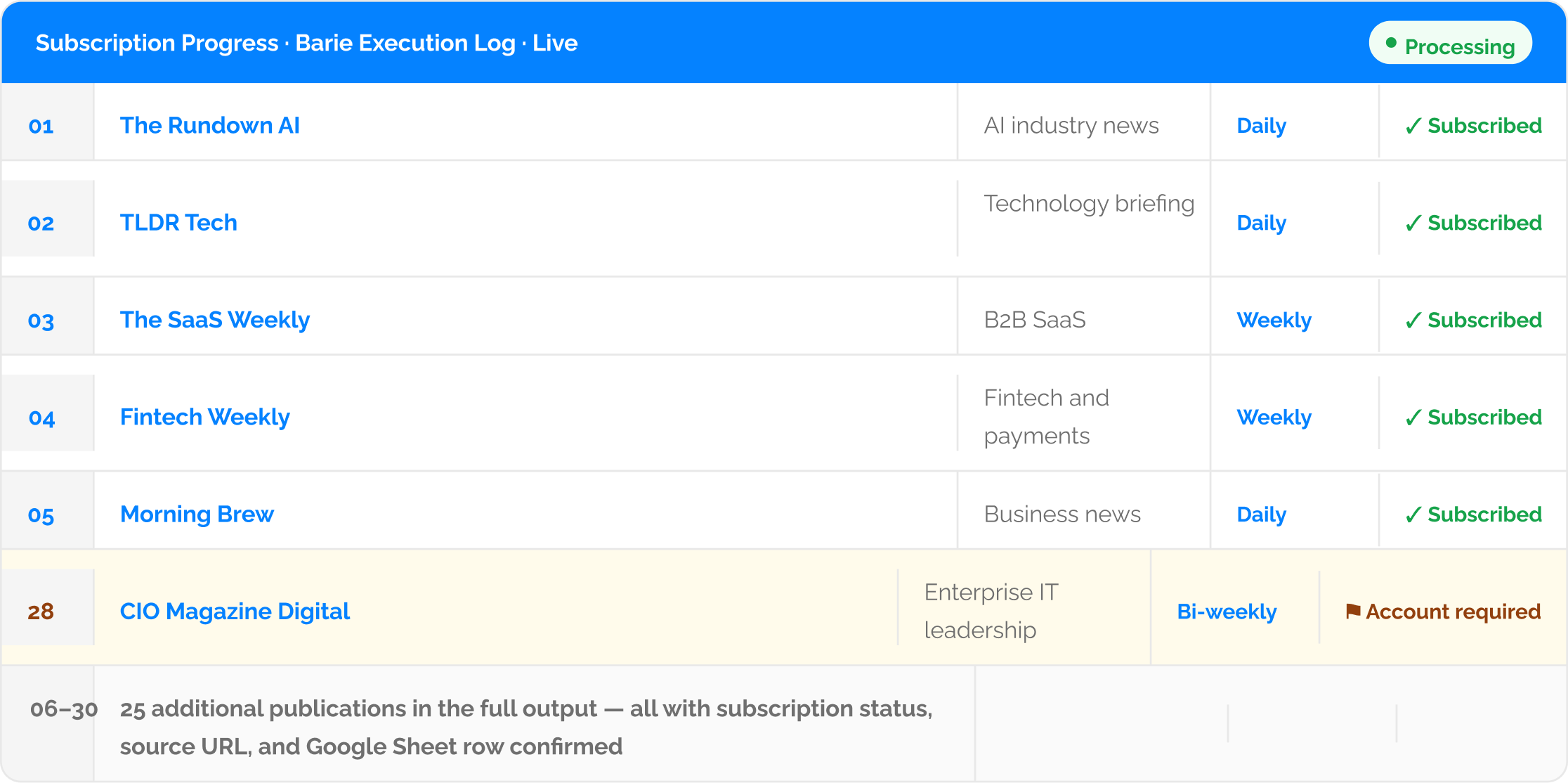
Three publications require manual completion and are flagged clearly: Where a signup page requires a full account creation, LinkedIn authentication, or company domain verification, Barie flags that subscription with a status of “Account required” rather than attempting to create a full account with the user’s credentials. The flag appears in the Google Sheet with the URL of the specific signup page so the user can complete those three in under five minutes, rather than discovering partway through a manual session that they need an account.
4: Google Sheets Output
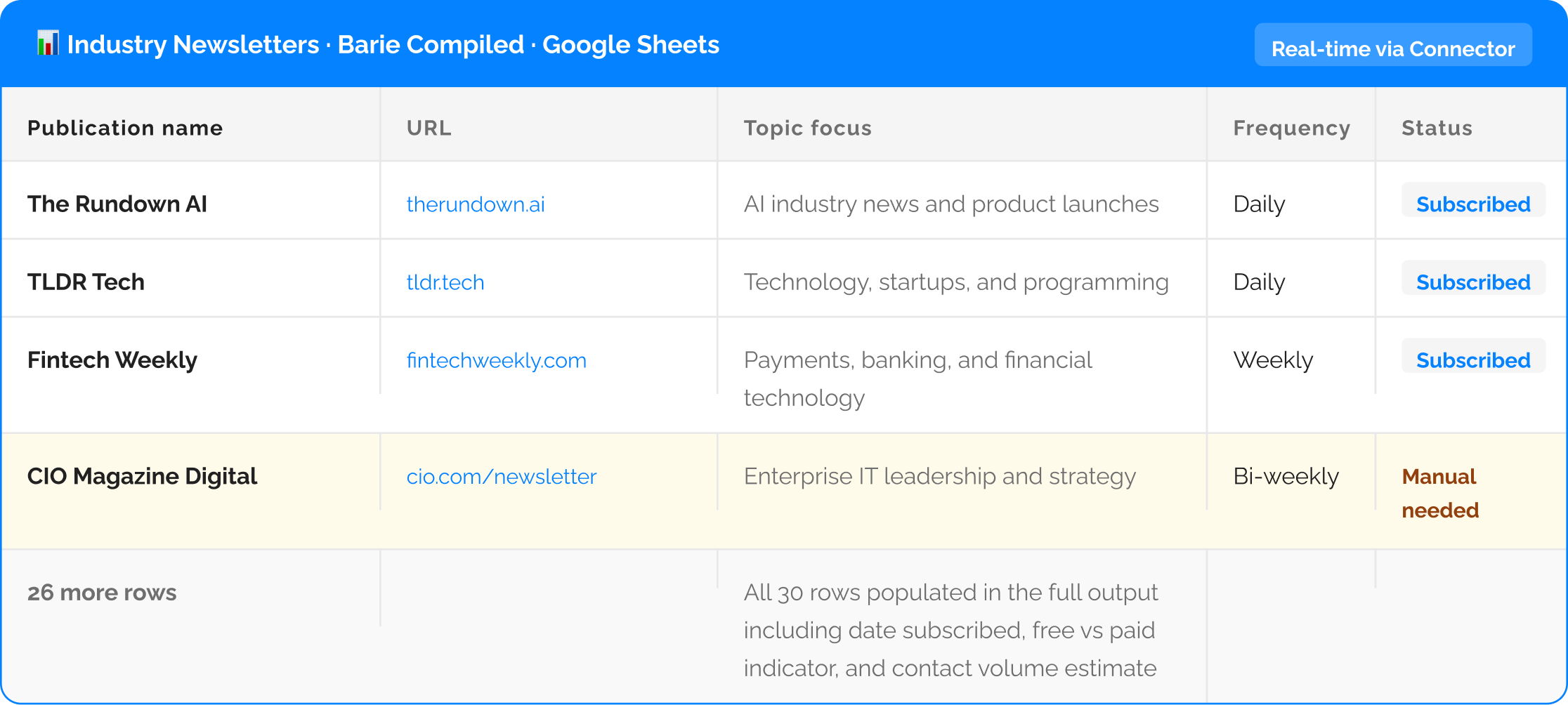
Step 4: The compiled spreadsheet — populated in real time via the Google Sheets Connector
The Google Sheet builds as subscriptions are confirmed rather than as a final export. By the time Barie has processed all thirty publications, the spreadsheet is already complete with all confirmed rows, flagged rows for manual follow-up, and the broken form record. No post-processing required.
Alongside the Google Sheet, Notion holds a categorised version of the same list organised by topic cluster rather than alphabetically. This makes it easier for the content team to reference when they want all fintech newsletters together, or all AI-focused publications in a single view. The Slack digest posts the full subscription summary to the content team channel so every team member knows which publications are now feeding into the team inbox.

Re-run quarterly to discover new publications: Industry newsletters launch and shut down continuously. Configure Barie to run a quarterly re-scan of the same niche search and compare the results against the existing Google Sheet. New publications that pass the qualification filter are added automatically. Publications that have gone inactive since the last run are flagged with a “check status” note. The list stays current without a full repeat of the session.
What you get
Thirty relevant industry newsletters and trade publications for your niche, discovered from five live sources and qualified against four criteria before a single subscription is attempted. Twenty-six successfully subscribed via automated form completion and Gmail inbox confirmation. Three flagged for manual completion with the specific signup URL included in the Google Sheet row. One broken form logged with the URL for reporting. A fully populated Google Sheet with publication name, URL, topic focus, frequency, subscription status, and date subscribed. The same list organised by topic cluster in Notion and shared to your content team Slack channel. All in one prompt session.
What would take a content strategist an afternoon of tab-switching and copy-pasting, Barie executes before the next meeting.
The Verdict
Finding newsletters and subscribing to them is not work that requires a human’s judgment. It requires a browser, a form, an inbox, and a spreadsheet. Barie has all four. The content strategist in this example deferred the task for four months because the execution cost was high relative to any single afternoon’s other priorities. When the execution cost is one prompt, the task gets done today. That is the practical consequence of agentic execution. Not a faster version of the same manual process. A different standard for which tasks are worth doing at all.
Barie features used in this task