How Barie creates a 60-second promotional video script, generates the video, and writes the YouTube SEO description in one session
Barie researches your product positioning and competitor launch videos, writes a punchy 60-second script structured around your strongest differentiators, generates the promotional video using AI video creation, and drafts an SEO-optimised YouTube description with researched keywords and timestamps. Script, video, and metadata — one prompt, one session, ready to upload.
The problem with how most product launch videos get made
A product team at a Series A startup had a launch date set. Six weeks out, they briefed a video production agency on a 60-second product overview video. The agency came back with a quote of £8,000 and a six-week production timeline that would deliver the final cut the day before launch, with no room for revisions.
The startup declined. The marketing lead wrote a script herself, passed it to a freelance video editor, and two weeks later received a cut that used generic stock footage with a voiceover that did not match the product positioning. Three rounds of revisions later, the video launched two weeks after the product did. By then, the launch window had closed.
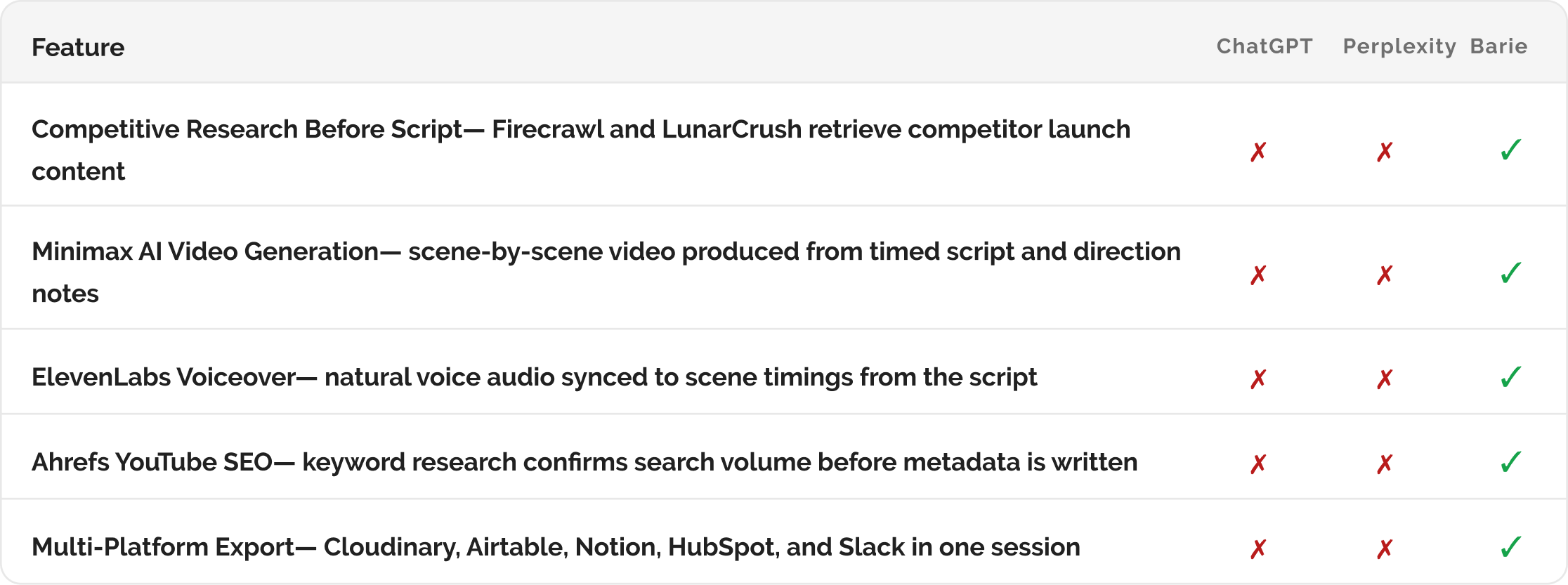
What Barie does that no other tool does: Barie closes the research-to-video loop in one session. It researches your product positioning, analyses competitor launch videos, writes a script informed by that analysis, generates the video from the script using the AI video creation module, voices it with ElevenLabs, and writes the YouTube description with keywords that Ahrefs confirms are being searched. The positioning expert and the video producer are the same prompt.
Your prompt
Task prompt
“Create a 60-second promotional video script for our product launch, generate the video, and draft the YouTube description with SEO keywords.”
One sentence. Three deliverables. Barie researches the competitive landscape for your product category, writes the script, generates the video through the AI video creation module, adds the voiceover, researches the keywords, and produces the YouTube metadata. Here is exactly how the workflow runs.
1: Research Before Writing
Step 1: Competitive research before the first word of script is written
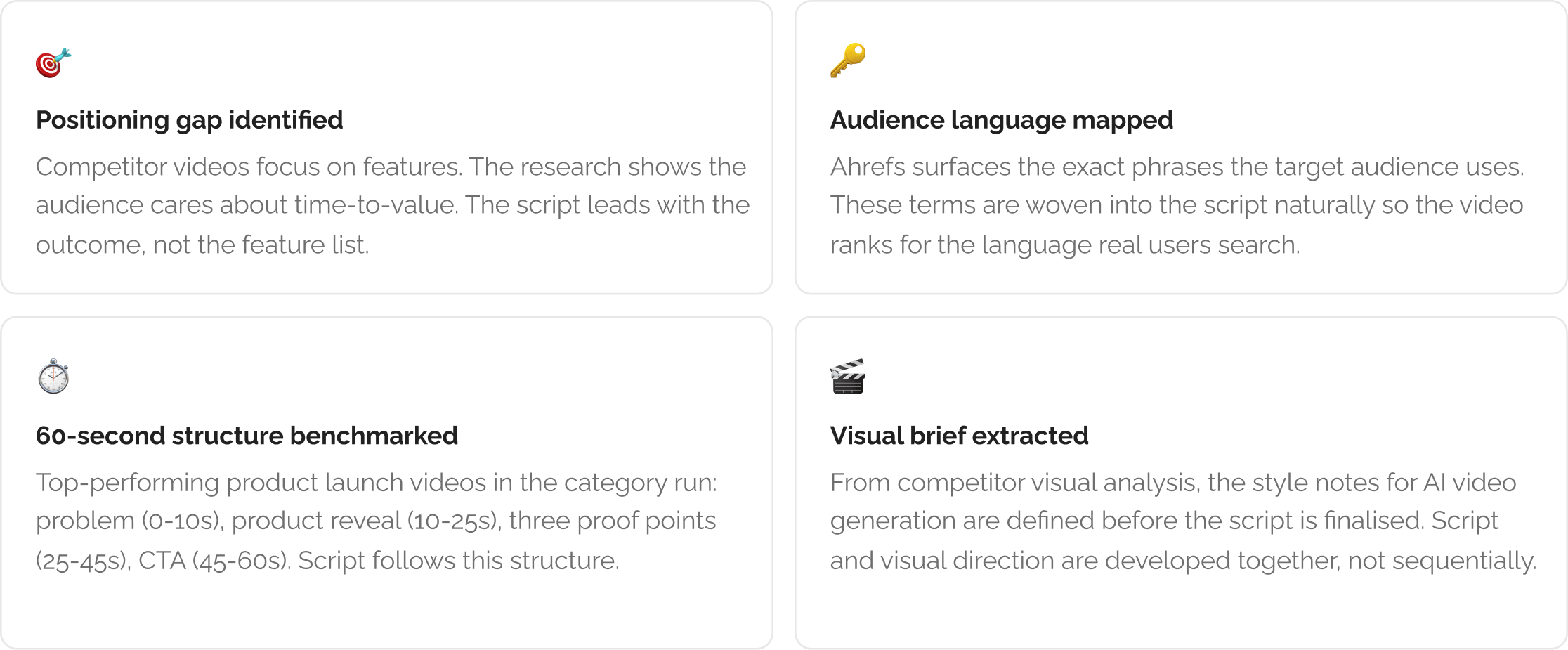
A promotional video script that is written without competitive context produces generic copy. Barie retrieves current data about how competitors are positioning their products in their own launch videos before starting the script. Firecrawl retrieves their YouTube pages and landing videos. LunarCrush surfaces which competitor videos are currently generating the most social traction. Media Watcher identifies the narrative angles competitors are using in their launch press coverage.

From this research, Barie identifies two things before writing a single word. First, the angles and claims competitors are leading with, which the script should either differentiate from or outframe. Second, the language and vocabulary that the target audience is using when searching for this product category, which informs how the script is written so it resonates with how the audience already thinks about the problem.
2. Script Writing
Step 2: The 60-second script — every scene timed, every line written to convert
The script is not a transcript of product features. It is a structured narrative built around the tension between the problem the audience has now and the outcome they want. Every second is accountable. At 150 words per minute for a comfortable voiceover pace, a 60-second script is 150 words. Not one more. Barie writes tight because it has to.
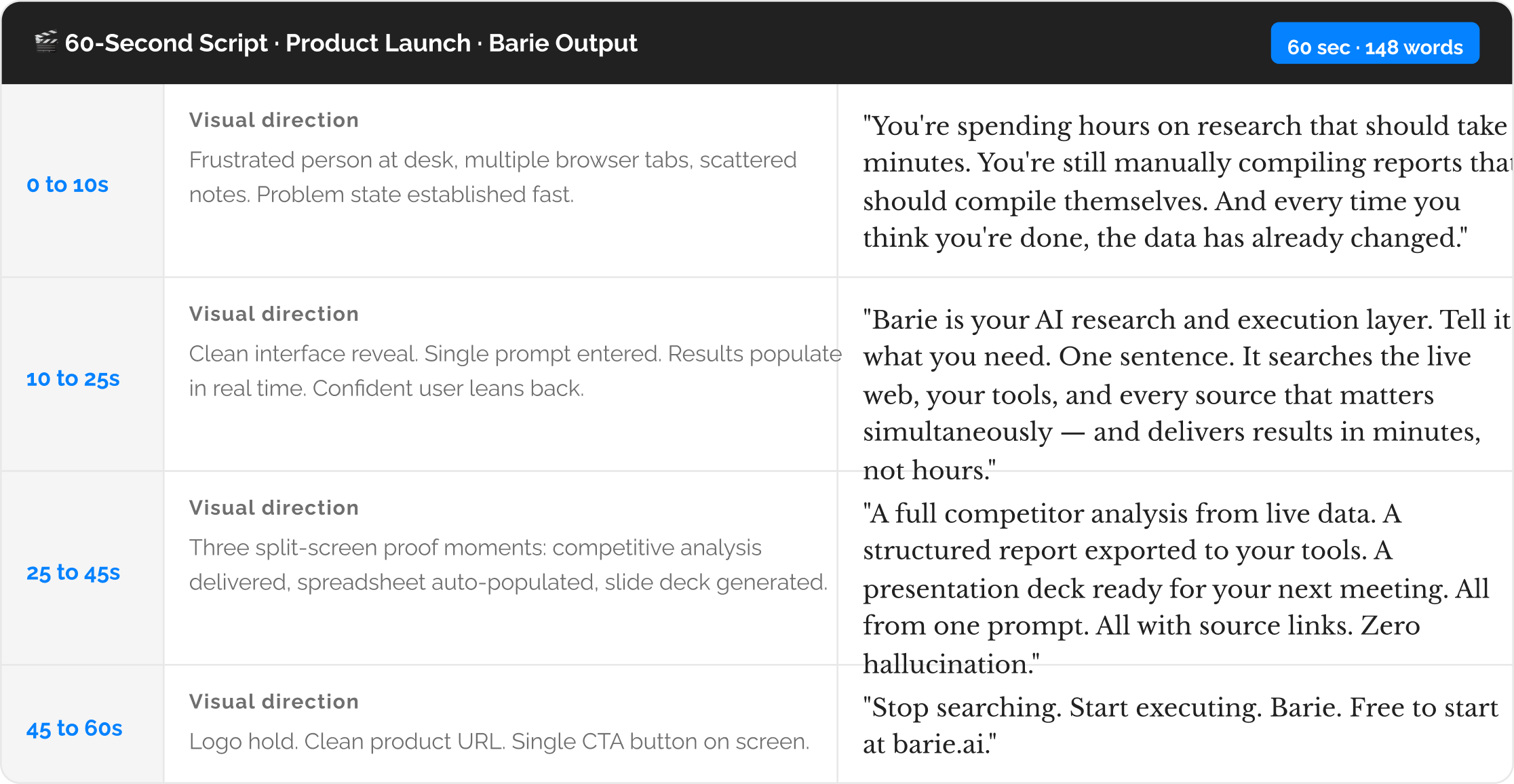
The script is timed before the video is generated: Each scene has a confirmed word count and duration before the AI video generation starts. This means the generated video scenes are the right length for the voiceover, not scenes that were generated at a generic length and then forced to match audio that runs at a different pace. Script timing and video generation are coordinated, not sequential.
3: AI Video Generation + Voiceover
Step 3: The video generated by AI — scenes, voiceover, captions, and final export

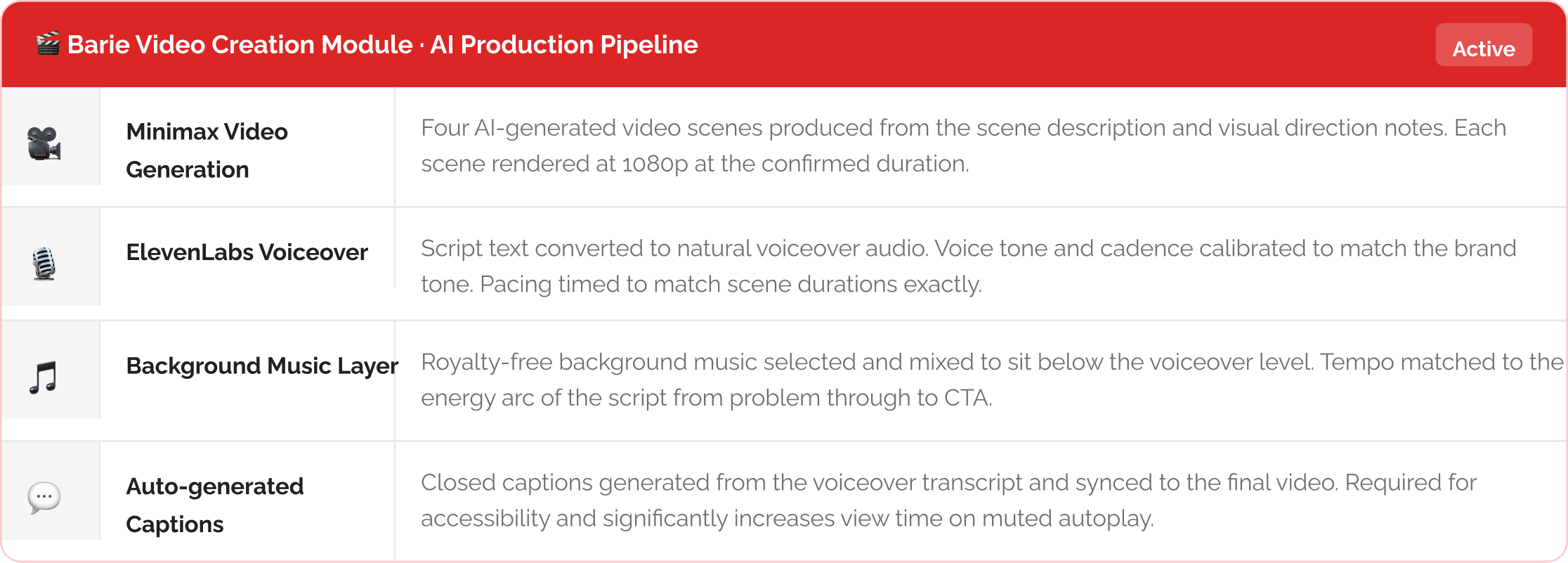
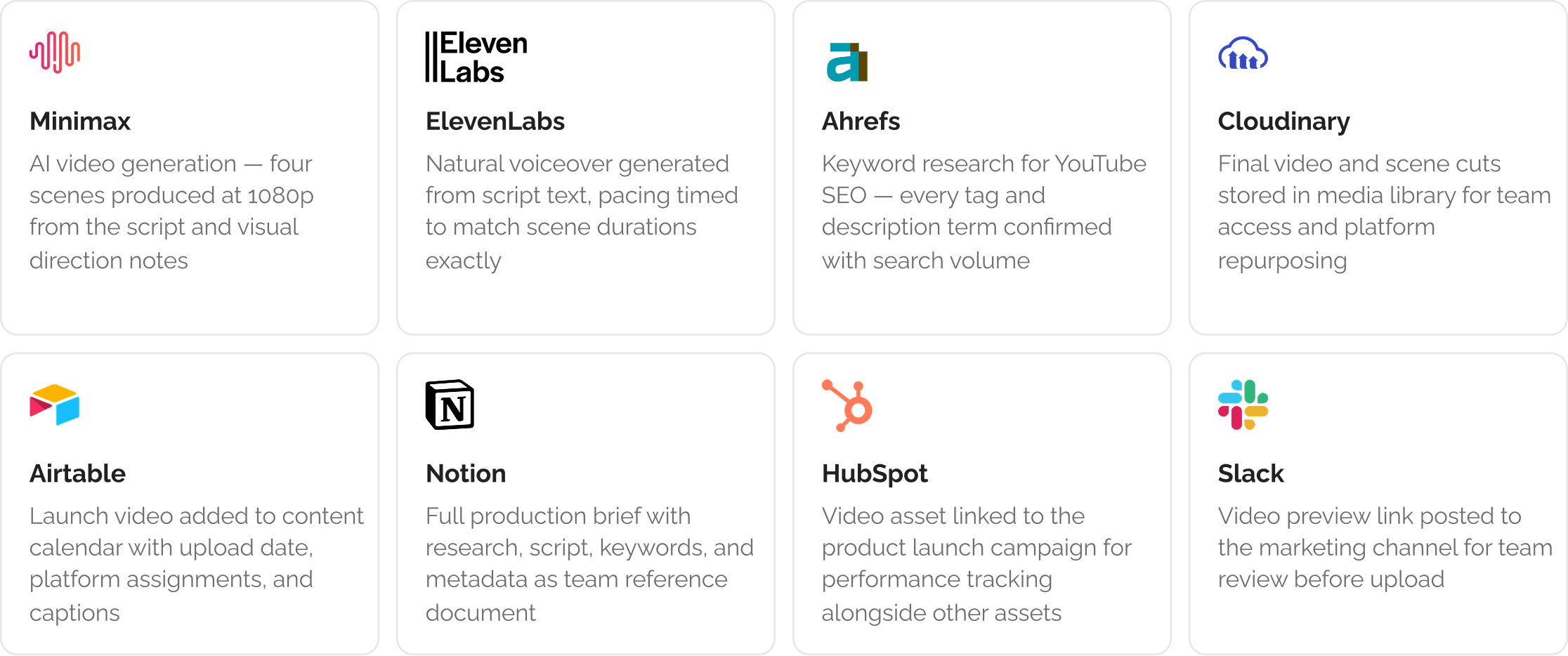
The video generation module takes the timed script and visual direction notes from Step 2 and produces each scene as an AI-generated video clip. Minimax handles the visual generation, producing motion-based video clips from the scene descriptions. ElevenLabs generates the voiceover from the script text, with the voice tone calibrated to match the product positioning, and the pacing aligned to the confirmed scene timings. The scenes are assembled into the final cut with the voiceover synced to within half a second of the scene transitions.

4: YouTube SEO Metadata
Step 4: The YouTube description, keywords, and timestamps — researched and written
The video is ready to upload. But a video without optimised metadata on YouTube is a video that does not get found. Barie uses Ahrefs keyword data to identify the specific search terms people are using to find product launch videos, product demos, and competitor alternatives in your category. The YouTube description is written around those terms, not as keyword stuffing but as naturally flowing context that satisfies both the viewer and the YouTube algorithm.
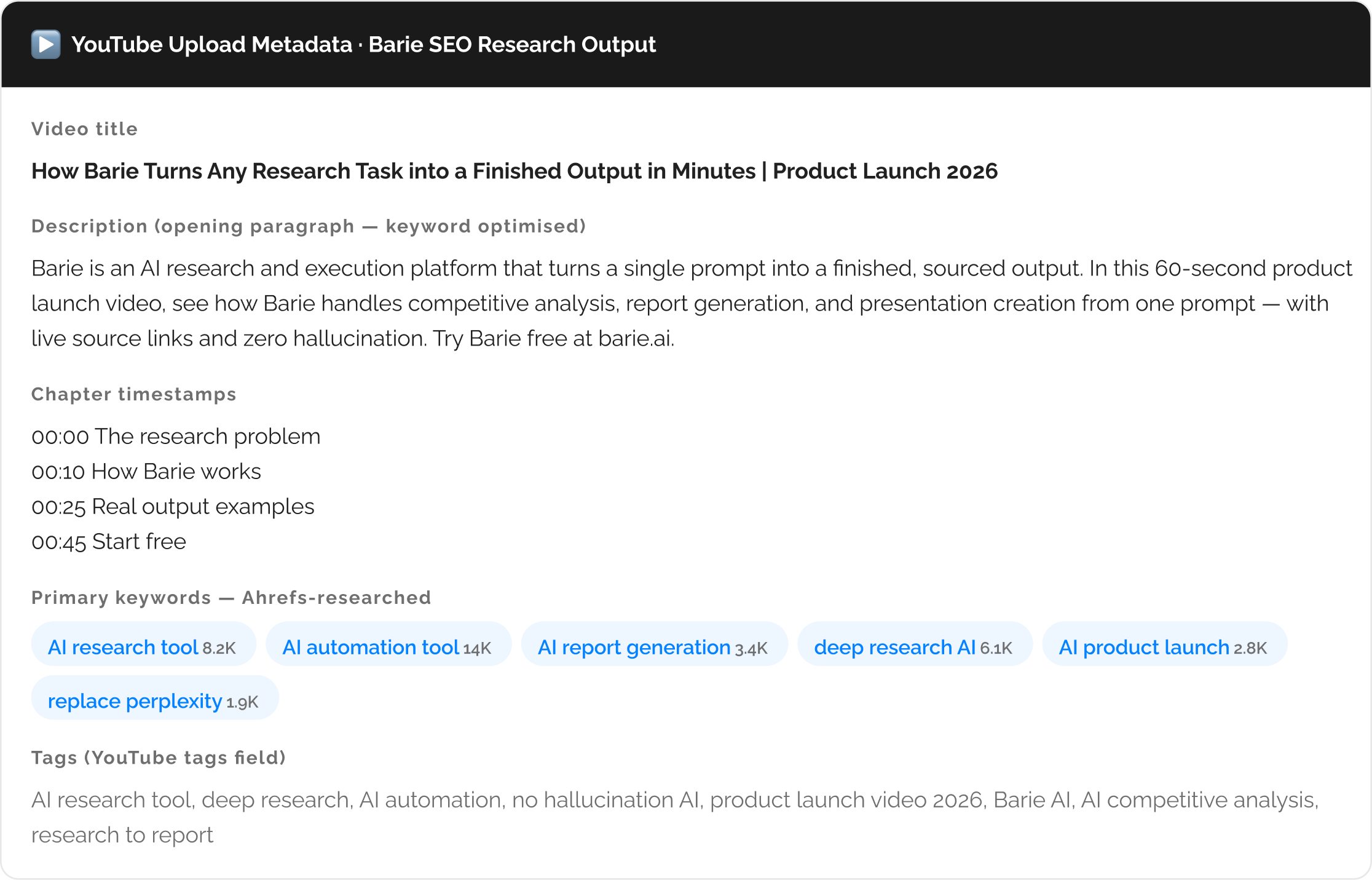
Keywords are researched, not guessed: Every keyword in the YouTube description and tags field is pulled from Ahrefs with confirmed search volume. The monthly search volume appears next to each keyword so the decision about which terms to prioritise is evidence-based. The description is not written with keywords inserted after the fact. The keywords are identified first, and the description is written so they appear naturally in the first 150 characters where YouTube’s algorithm weights them most.
5. Distribute Across Platforms
Step 5: Video and metadata distributed across your content and publishing tools
The video is generated, the metadata is written, and the assets are ready. Barie routes everything to the tools your team uses to publish and amplify content. Cloudinary stores the final video file and the scene-level cuts in your media library so the team can access individual clips for shorter social cuts without re-running the generation. Airtable receives the launch video as a content calendar entry with the upload date, platform assignments, and caption fields pre-populated.
For LinkedIn, a vertical cut of the hero scene is generated automatically as a separate asset, formatted for LinkedIn video’s native player dimensions. For Instagram Reels, the same vertical cut is optimised with the captions already sized and positioned for the Reels frame. Notion holds the full production brief — the competitive research summary, the script with direction notes, the keyword research findings, and the YouTube description — as a single reference document so the next launch video can be briefed with a starting point rather than a blank page.
Platform cuts generated from the same session: The 16:9 YouTube cut, the 9:16 LinkedIn and Instagram Reels cut, and a 1:1 square cut for Twitter and Facebook are all generated in the same session from the same source scenes. You do not need to re-run the video generation for each platform format. Barie produces all three aspect ratios from the same visual assets and delivers them as separate downloadable files.
What you get
A competitive research brief informing your product positioning. A timed 60-second promotional video script with scene-by-scene direction notes. A finished AI-generated video at 1080p with ElevenLabs voiceover, background music, and auto-generated captions. Platform cuts in 16:9, 9:16, and 1:1 formats. An SEO-optimised YouTube description with Ahrefs-researched keywords, chapter timestamps, and a tags field ready to paste. All distributed to Cloudinary, Airtable, Notion, HubSpot, and Slack in the same session.
What it would take a production agency six weeks and £8,000 to produce, Barie delivers before your launch window closes. No brief documents. No freelancer coordination. No revision rounds. One prompt, three deliverables, ready to upload.
The Verdict
Product launch videos miss their window because the production process and the positioning process are two separate workflows with two separate timelines. Barie runs them as one. The competitive research directly informs the script. The script directly briefs the video generation. The keyword research directly produces the YouTube metadata. There is no handoff between a strategist and a producer, no briefing document that gets partially implemented, no revision round where the message gets diluted. One session. One prompt. A finished video that is ready to upload on launch day, not two weeks after it. That is the difference between a production process and an execution capability.
Barie features used in this task