





Based on Forrester’s Developer Survey, the developers are found to be doing only 24 % of actual coding as their main task, which shows the amount of time work is done is not that effective because of the other tasks and switching of contexts and tools. That’s a huge time loss indeed.
All the developers know how easily the switching of context can be tiring. The writer goes through the code one minute; next, they are toggling through the tabs trying to debug the problem, or he/she might be desperately looking up the documentation to grasp the main problem.
What if the whole thing could be simplified, and your focus could be kept where it is, hardly on the code?
The VS Code Extension does exactly that. If you have been silently bearing the developer’s troubles and trying to find a way of making your development process smoother, look no further. The Extension incorporates the power of an AI-backed assistant right into your editor, thus making your workflow less tedious and more effective.
Why the VS Code Extension is a Game-Changer
Now, what do you think the reason is for you to get this? Just because the time that you are spending switching tabs, looking for documentation, and debugging can be a time for you to be developing excellent software. It does all that quickly, making your workflow more efficient and saving you from the headache of dealing with too many tools. Whether you are a lone wolf developer or part of a larger team, the extension allows you to do your work with the least possible effort, especially when combined with AI connectors that unify fragmented tools and workflows.
Understanding the VS Code Extension
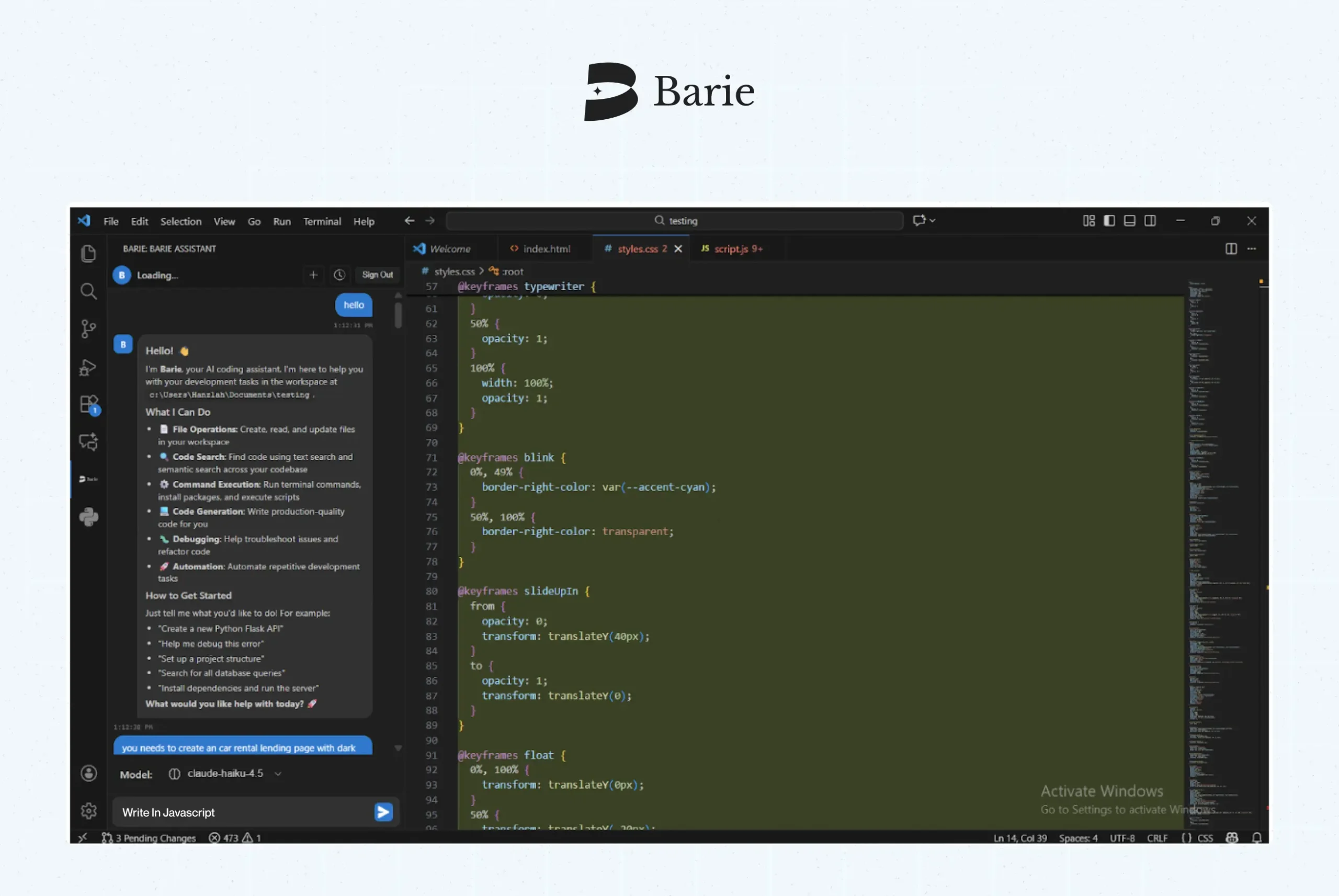
This extension is like a very effective helper in your application. It makes coding, debugging, writing documentation, and creating test cases all possible with AI support, and you can do it with ease in the VS Code workspace.
Think about it this way: you’re facing a difficult piece of code, but you don’t know how to proceed. You could spend long hours searching for solutions or just posting your problem on Stack Overflow, but you can ask your editor directly instead. The editor then responds with a clear and useful answer so that you can proceed without the hassle of switching back and forth between tools all the time.
The Solution You Have Been Looking For
Using the VS Code Extension, you will not have to deal with those annoying distractions anymore. Everything you need—be it code suggestions, debugging assistance, or even boilerplate code generation—is easily accessible to you. Here is how it works:
- Real-Time Assistance: Ask inquiries straight in VS Code and receive instant, related replies.
- Code Generation & Refactoring: With comfort, create code snippets, clean up disordered code, or even compose entire parts of your project.
- Instant Debugging: Detect faults rapidly and receive prompts for solutions, thus conserving your valuable time.
- Custom Prompts: Are you in need of a distinct function or module? Simply write out your demand and allow the tool to take care of it.
It is all about making your workflow more efficient and accomplishing more within the same time—right in your code editor.
Use Cases: How the Extension Makes Your Life Easier
The Extension is beneficial in the following cases below for day-to-day development tasks:
- Code Explanations & Documentation: Do you ever encounter code written by others and wonder what its purpose is? Well, just put in your request, and the AI will explain the code in an easy way.
- Boilerplate Code & Test Case Generation: Let the extension take care of the boilerplate code, along with the generation of test cases that will make sure that the code gives the right output.
- Refactoring & Code Optimization: It can point out areas where code can be improved in terms of cleanup, speed, and clarity.
- Real-Time Troubleshooting: Are you having a problem with your code? Ask for help, and it will propose solutions and guide you to the right path.
Benefits of the VS Code Extension
For the still hesitant users, here are the reasons why it is a revolutionary tool:
Boosts Your Productivity
No more time wasted on searches, and now it is all about the code. The VS extension will be doing the hard part, whether you need to write code, correct bugs, or create manuals.
Improves Code Quality
It offers better quality code because of its suggestions for changes and support for refactoring.
Customizable to Your Style:
The extension is your assistant, which will be customized after every session and will become more efficient each time.
Reduces Context Switching
Make it all happen within VS Code, so you do not have the hassle of switching from one tool or app to another.
Real-Time Feedback
A Great time saver is instant feedback. Receive guidance on your code while working, which assists you in enhancing and resolving issues rapidly.
How Barie VS Code Extension Stacks Up Against the Competition
Barie has a few key points that make it prominent among other alternatives:
- Comprehensive AI Integration: Barie not only does real-time feedback, code generation, refactoring, and even documentation generation, but also does all of it at the same time. It’s a complete solution; thus, there’s no need to look for others.
- Smarter, Contextual Suggestions: Barie isn’t merely giving you arbitrary suggestions but learning through your coding style and preferences, thus offering personalized help over time.
- Seamless Integration: Barie works in collaboration with VS Code, so there’s no switching among several tools or platforms. Everything is under one roof, making your workflow less hectic and more productive with AI connectors.
- AI-Powered Performance: In contrast to other assistants that operate through basic coding libraries or predetermined templates, Barie’s AI learns and adapts to your requirements and gets better with every use.
- Data Privacy: Barie will make it impossible for anyone to access your code. With Barie, there is no reason for you to be concerned that your work will be shared or even come to the attention of third parties—your data remains confidential.
Work Smarter with Barie VS Code Extension
The Barie VS Code Extension isn’t just another productivity tool—it’s your new best friend in the development process. Whether you’re writing code, debugging, or generating test cases, Barie helps you get it done faster, smarter, and more efficiently.
Want to try it for yourself?
Download the Barie VS Code Extension today and take the first step toward supercharging your workflow.